<?xml version="1.0" encoding="utf-8"?>
<feed xmlns="http://www.w3.org/2005/Atom">
  <title>illithya.rocks blog</title>
	<subtitle>A feed of the latest blog posts.</subtitle>
  <description>Multidisciplinary artist, technologist, and educator with a background in creative development and design. Available for commissions and work collaborations.</description>
  <logo>https://www.ilithya.rocks/images/smiley-low.gif</logo>
  <language>en-US</language>
	<link href="https://www.ilithya.rocks/feed.xml" rel="self"/>
	<link href="https://www.ilithya.rocks/"/>
	<updated>2023-06-12T00:00:00Z</updated>
	<id>https://www.ilithya.rocks</id>
	<author>
    <name>ilithya</name>
	</author>
	
    
    <entry>
      <title>Shaders in sketches — Step</title>
      <link href="https://www.ilithya.rocks/blog/shaders-in-sketches-step/"/>
      <updated>2023-06-12T00:00:00Z</updated>
      <id>https://www.ilithya.rocks/blog/shaders-in-sketches-step/</id>
      <content type="html"><![CDATA[
      <img src="https://www.ilithya.rocks/images/ilithya-rocks-v3.jpg" alt="Screenshot of ilithya.rocks homepage">   
      <p>Welcome to a small series of short posts where I thought of sharing how my brain works when it tries to explain to me some of the <abbr title="OpenGL Shading Language">GLSL</abbr> built-in functions I use when I make pixel shaders.</p>
<p>Shaders can be a rather complex and intimidating computer program to explore when one's new to it, but maybe it's all about perspective and how one can interpret the program pieces to make them work.</p>
<p>Maybe so far everything you've read or watched hasn't triggered your <em>aha moment</em>. Maybe your thoughts haven't been able to put the puzzle pieces together yet —— don't give up! Maybe these short posts might share a little light in the tunnel.</p>
<p>Understanding what exactly some of the <abbr title="OpenGL Shading Language">GLSL</abbr> standard functions do, has helped me in my quest to understand and write pixel shaders. Perhaps my way of understanding can help others too.</p>
<p>By the way, I'm starting a newsletter. If you prefer to skip this post, go to the <a href="#newsletter">newsletter section</a> directly.</p>
<h3>Step function</h3>
<p>To get started, let's travel through the <code>step()</code> function, which takes two parameters to compare:</p>
<pre class="language-glsl"><code class="language-glsl">  <span class="token function">step</span><span class="token punctuation">(</span>edge<span class="token punctuation">,</span> x<span class="token punctuation">)</span>  </code></pre>
<p>The links in the references below give us a description for this <abbr title="OpenGL Shading Language">GLSL</abbr> function:<br>
<strong><code>0.0</code> is returned if <code>x &lt; edge</code>, and <code>1.0</code> is returned otherwise.</strong></p>
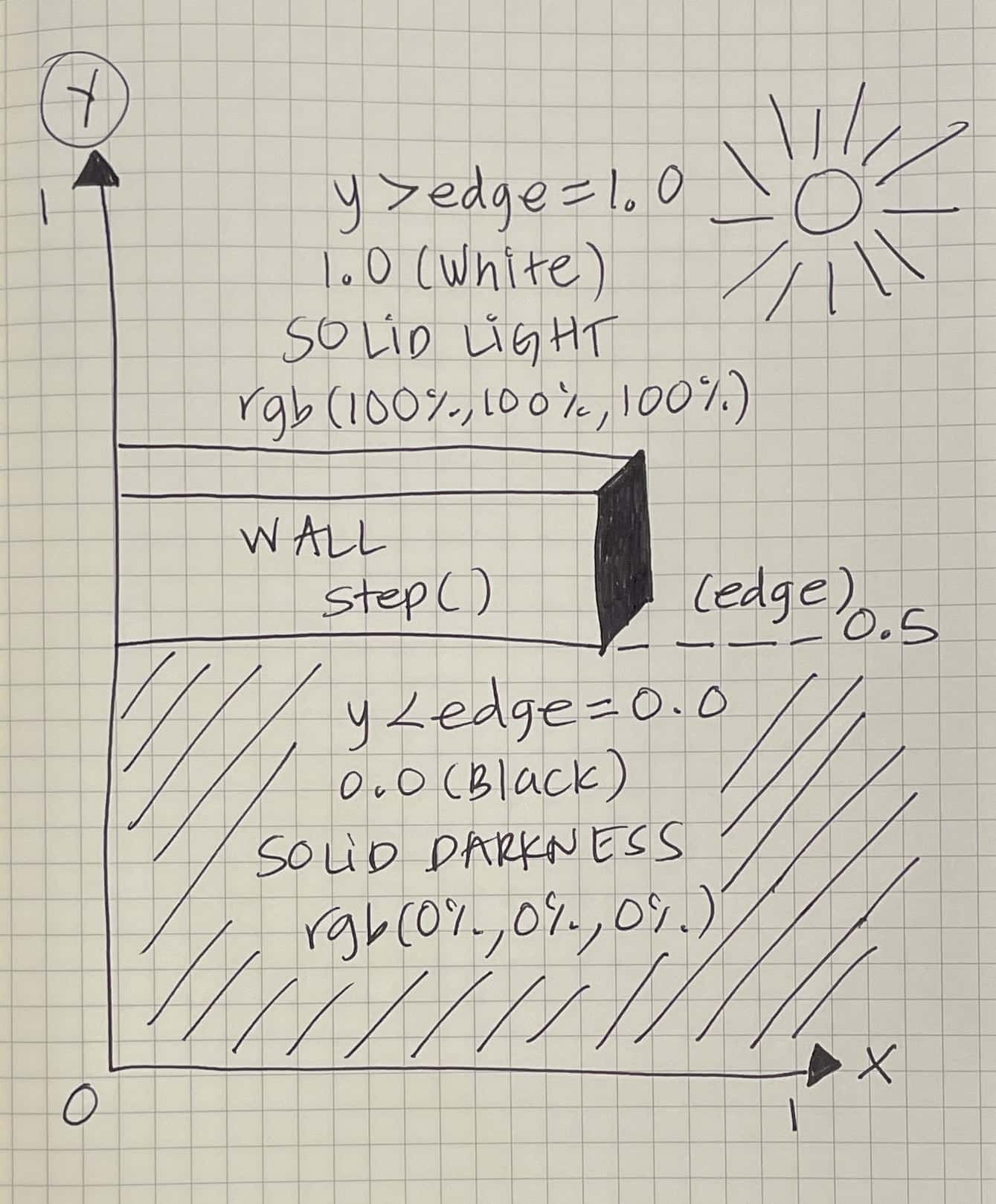
<p>But what does that mean? In my head, seeing a mathematical graph wasn't enough. My <em>aha moment</em> arrived, once I visualized the function as a tall wall separating two sides with solid colors.</p>
<figure>
    <img 
        src="/blog/images/2023/shaders-in-sketches-step/low/ilithya-sketches-step-y-low.jpg" 
        data-src="/blog/images/2023/shaders-in-sketches-step/ilithya-sketches-step-y.jpg" 
        alt="ilithya's sketch of a wall in the y coordinate" 
        loading="lazy" 
        draggable="false" 
        class="c-preloader lazyload"
        width="400">
    <figcaption class="c-caption">
        Shader sketch of GLSL step function: x = y
        <br><small>© ilithya</small>
    </figcaption>
</figure>
<p>The two colors are black and white. Black when getting <code>0.0</code>, and white when getting <code>1.0</code>. In a pixel shader or better known as a fragment shader, the color outputted in your screen comes from a vector with four values — <code>vec4()</code>.</p>
<p>That <code>vec4()</code> is the returned value of <code>gl_FragColor</code> which takes the first three values as an <em>RGB</em> color model and the last value as an alpha value for transparency. By focusing on a <code>vec3()</code> inside that <code>vec4()</code> containing three values, we can guess the color appearing in the screen — <code>vec3(R, G, B)</code>:</p>
<ul>
<li>1 value for R (red channel)</li>
<li>1 value for G (green channel)</li>
<li>1 value for B (blue channel)</li>
</ul>
<p>For this exemplification, if <code>step()</code> results in <code>0.0</code>, we can assign that value to all of those three values from the RGB color model as a <code>vec3(0.0, 0.0, 0.0)</code>, which in <abbr title="OpenGL Shading Language">GLSL</abbr> it can also be declared as a <code>vec3(0.0)</code>.</p>
<p>If we dig deep into the RGB color model, colors can be expressed in different ways. One is as a percentage, where the black color is represented with three values <code>(0%, 0%, 0%)</code>, and another one is the regular 8-bit <code>(0, 0, 0)</code>.</p>
<p>The white color in the 8-bit expression is <code>(255, 255, 255)</code>, while as a percentage (going from 0%-100%) is <code>(100%, 100%, 100%)</code>, which in <abbr title="OpenGL Shading Language">GLSL</abbr> translates as a <code>vec3()</code> with three floating-point numbers as values — <code>vec3(1.0, 1.0, 1.0) = vec3(1.0)</code>.</p>
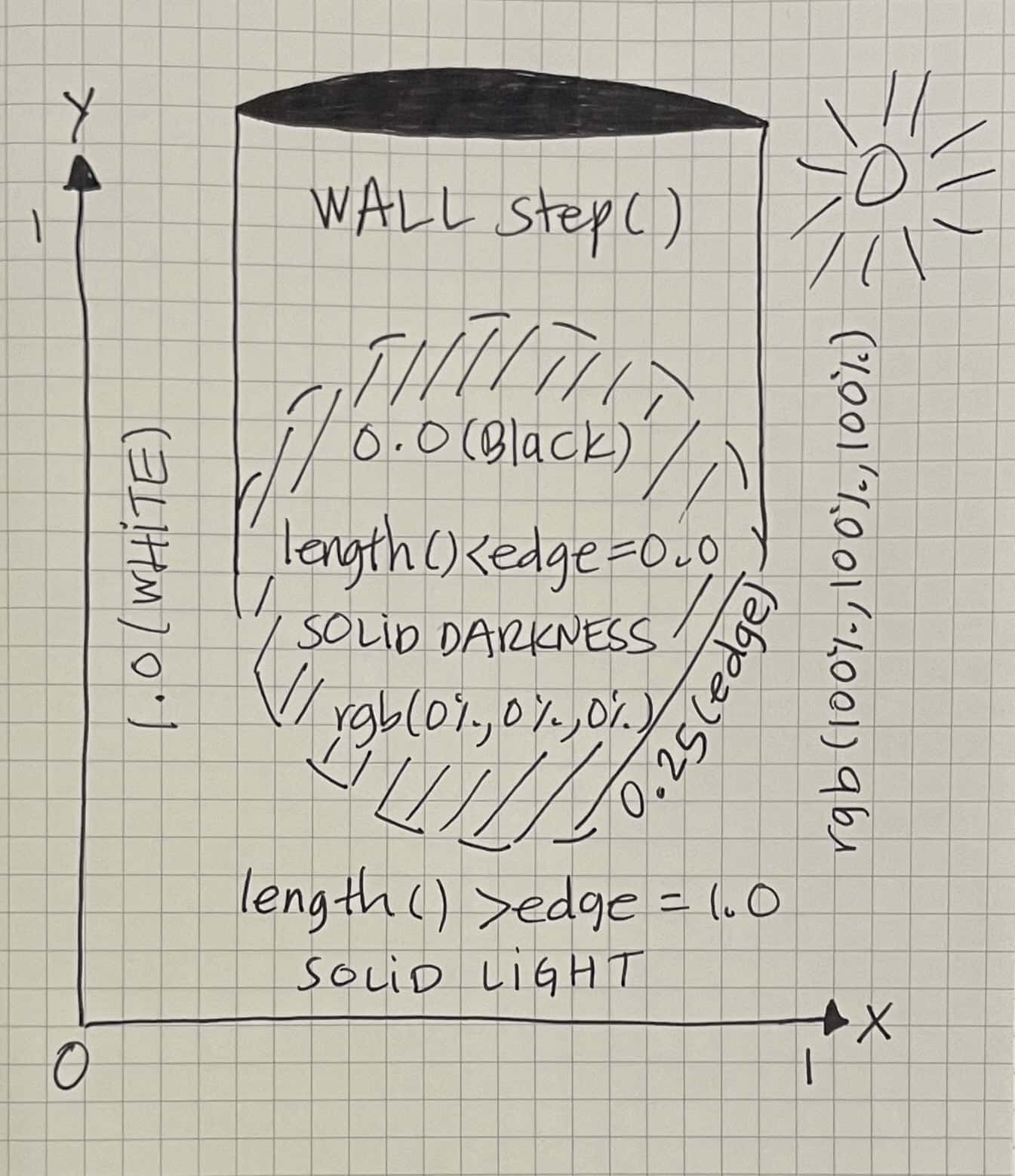
<p>No matter if <code>x</code> is a linear coordinate or a distance between two or more points in a plane, build an imaginary wall splitting two colors. As long as I visualize such a wall growing from the <code>edge</code> whenever I use this function, I can make a clear picture of what that code will draw.</p>
<figure>
    <img 
        src="/blog/images/2023/shaders-in-sketches-step/low/ilithya-sketches-step-length-low.jpg" 
        data-src="/blog/images/2023/shaders-in-sketches-step/ilithya-sketches-step-length.jpg" 
        alt="ilithya's sketch of a wall surrounding a circle in a plane" 
        loading="lazy" 
        draggable="false" 
        class="c-preloader lazyload"
        width="400">
    <figcaption class="c-caption">
        Shader sketch of GLSL step function:  x = length() 
        <br><small>© ilithya</small>
    </figcaption>
</figure>
<p>References:</p>
<ul>
<li><a href="https://thebookofshaders.com/glossary/?search=step" target="_blank" rel="external noopener noreferrer" title="Glossary: Step Function">Book of Shaders</a></li>
<li><a href="https://registry.khronos.org/OpenGL-Refpages/gl4/html/step.xhtml" target="_blank" rel="external noopener noreferrer" title="Reference Documentation: Step Function">Khronos Wiki</a></li>
</ul>
<h3>Newsletter</h3>
<p>I'm starting a tiny newsletter where I intend to share the rest of this series of posts with sketches.</p>
<p>I'll probably still post them eventually here on my blog, but if you prefer to receive them in your mailbox, <a href="https://ilithya.substack.com/?showWelcome=true" target="_blank" rel="external noopener noreferrer" title="ilithya's tiny newsletter">subscribe</a>!</p>
<p>It might be possible I'll also share other news about personal projects, art + tech topics, and whatnot.</p>
<p>You can expect no schedule and no spam. I imagine the most frequently I could write would be weekly or biweekly. Maybe once a month or every couple of months. It all depends on the flow and feel + life. ✌🏽</p>
<iframe 
    class="c-preloader"
    src="https://ilithya.substack.com/embed" 
    title="ilithya's newsletter subscription"
    width="800" 
    height="550" 
    frameborder="0" 
    scrolling="no"
></iframe>
    ]]></content>
    </entry>
	
    
    <entry>
      <title>Happy accidents</title>
      <link href="https://www.ilithya.rocks/blog/happy-accidents/"/>
      <updated>2023-01-30T00:00:00Z</updated>
      <id>https://www.ilithya.rocks/blog/happy-accidents/</id>
      <content type="html"><![CDATA[
      <img src="https://www.ilithya.rocks/images/ilithya-rocks-v3.jpg" alt="Screenshot of ilithya.rocks homepage">   
      <p>A journey of imperfections, beautiful bugs, and happy accidents... in generative art.</p>
<p>Back in November 2022, I gave a short 10-min Spanish talk at a Meetup organized by <a href="https://www.brightmoments.io/mexico-city/" target="_blank" rel="external noopener noreferrer">Bright Moments</a> in Ciudad de México.</p>
<p>I felt the content I shared in such a talk was valuable and could inspire more people getting started with generative art, hence this post.</p>
<p>Since I didn't want to only speak about my opinion on the matter, I asked a few friends in the field to share with me some of their work and experiences — big thanks to each one of you for sharing, letting me share, and for delivering in such a tight deadline. 😬</p>
<p>Happy reading!</p>
<h3>Art with imperfections</h3>
<p>Generative art is art that involves the automation of a system to create art. A place where chance and spontaneity meet.</p>
<p>In digital art, it's a collaboration between a human and a machine, where the human sets the parameters and restrictions of a system, in which the machine has some freedom to make decisions that will influence the output.</p>
<p>Because of that lack of control on the human part, I like to think of generative art as <em>art with imperfections</em>.</p>
<p>I believe that generative art written with algorithms sometimes could be referred to as <em>beautiful bugs</em>, when an error in the system could produce an unintended pleasant output.</p>
<p>Computer errors that, in the software field would not be desired and rejected, are welcomed in generative art, as long as they don't block the system's output.</p>
<p>Fearing less writing an algorithm that could be prone to errors, one has more freedom for writing the unknown. Typing equations that one has no idea what mathematical meaning they might have, it's not out of the question.</p>
<p>In generative art, as long as the eyes meet something satisfying in a system's output, one could dare to face the unknown, occasionally or always, and call it a happy accident.</p>
<p>Let's see some examples: ✨</p>
<ul>
<li><a href="#nicole-vella">Nicole Vella</a></li>
<li><a href="#alex-torres">Alex Torres</a></li>
<li><a href="#dominique-schmitz">Dominique Schmitz</a></li>
<li><a href="#daniel-velasquez">Daniel Velasquez</a></li>
<li><a href="#tim-pietrusky">Tim Pietrusky</a></li>
<li><a href="#sam-wray">Sam Wray</a></li>
</ul>
<p>I was not surprised <a href="https://twitter.com/shiffman" target="_blank" rel="external noopener noreferrer" title="Daniel Shiffman's Twitter Profile">@shiffman</a> was mentioned more than once. Big shout-out to the <a href="https://thecodingtrain.com/" target="_blank" rel="external noopener noreferrer">Coding Train</a> for making creative coding accessible to us regarding one's background and experience.</p>
<h3>Nicole Vella</h3>
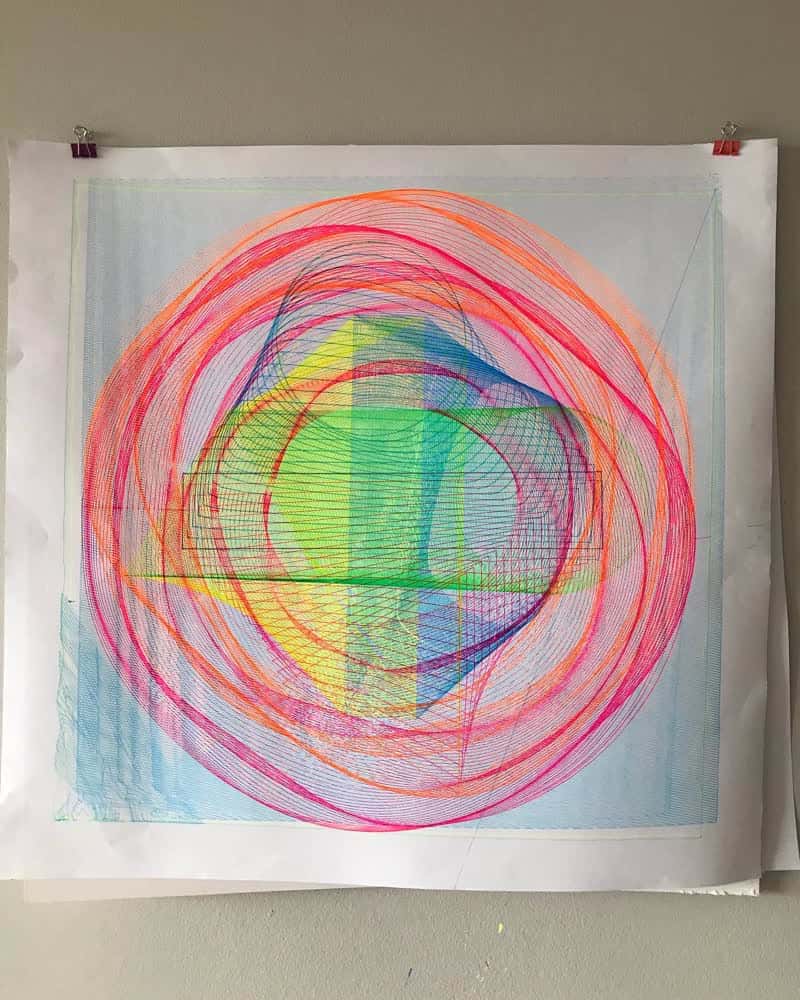
<p><a href="https://twitter.com/nicolevellaart" target="_blank" rel="external noopener noreferrer" title="Nicole's Twitter Profile">@nicolevellaart</a> is a Canadian artist, developer, and teacher living in Toronto.</p>
<figure>
    <img 
        src="/blog/images/2023/happy-accidents/nicole-01.jpg" 
        data-src="/blog/images/2023/happy-accidents/nicole-01.jpg" 
        alt="Nicole Vella's plotter artwork" 
        loading="lazy" 
        draggable="false" 
        class="c-preloader lazyload"
        width="400">
    <figcaption class="c-caption">
        Embracing the Error — Exhibit A 
        <br><small>© Courtesy of the artist</small>
    </figcaption>
</figure>
<blockquote>
  <p>This piece was generated in Processing (JAVA). I drew/coded simple shapes with single-stroke lines and then blended the shapes together, with the intention of plotting it onto A1 paper. It was supposed to consist of sharp and precise lines, and during the test print, it was printing as expected. I then went back to Processing to change the shapes and while doing so, I updated the firmware on my plotter.</p>
  <p>When I went to plot the updated SVGs, the plotter began to move erratically and was stuttering. I realized that the SVG code I was generating with Processing was not fully compatible with the updated firmware on my plotter, and there must have been some bug I needed to work out.</p>
</blockquote>
<figure>
    <img 
        src="/blog/images/2023/happy-accidents/nicole-02.jpg" 
        data-src="/blog/images/2023/happy-accidents/nicole-02.jpg" 
        alt="Nicole Vella's plotter artwork — Close-up" 
        loading="lazy" 
        draggable="false" 
        class="c-preloader lazyload"
        width="400">
    <figcaption class="c-caption">
        Embracing the Error — Exhibit B  
        <br><small>© Courtesy of the artist</small>
    </figcaption>
</figure>
<blockquote>
  <p>I was, however, extremely pleased with the texture of the glitched-out lines being plotted. Instead of trying to fix my SVG, I leaned into it and began generating more shapes from Processing using the same underlying code. I plotted these shapes on top of one another; giving a layered feel to the print as well as adding depth.</p>
  <p>After 9 layers of different line patterns plotted in neon ink, I felt the piece was finished.</p>
</blockquote>
<h3>Alex Torres</h3>
<p><a href="https://twitter.com/spacepolyg0n" target="_blank" rel="external noopener noreferrer" title="Dominique's Twitter Profile">@spacepolyg0n</a> is a Mexican front-end developer and generative artist based in Hamburg.</p>
<figure>
    <img 
        src="/blog/images/2023/happy-accidents/alex-01.jpg" 
        data-src="/blog/images/2023/happy-accidents/alex-01.jpg" 
        alt="Alex Torres' generative artwork" 
        loading="lazy" 
        draggable="false" 
        class="c-preloader lazyload"
        width="400">
    <figcaption class="c-caption">
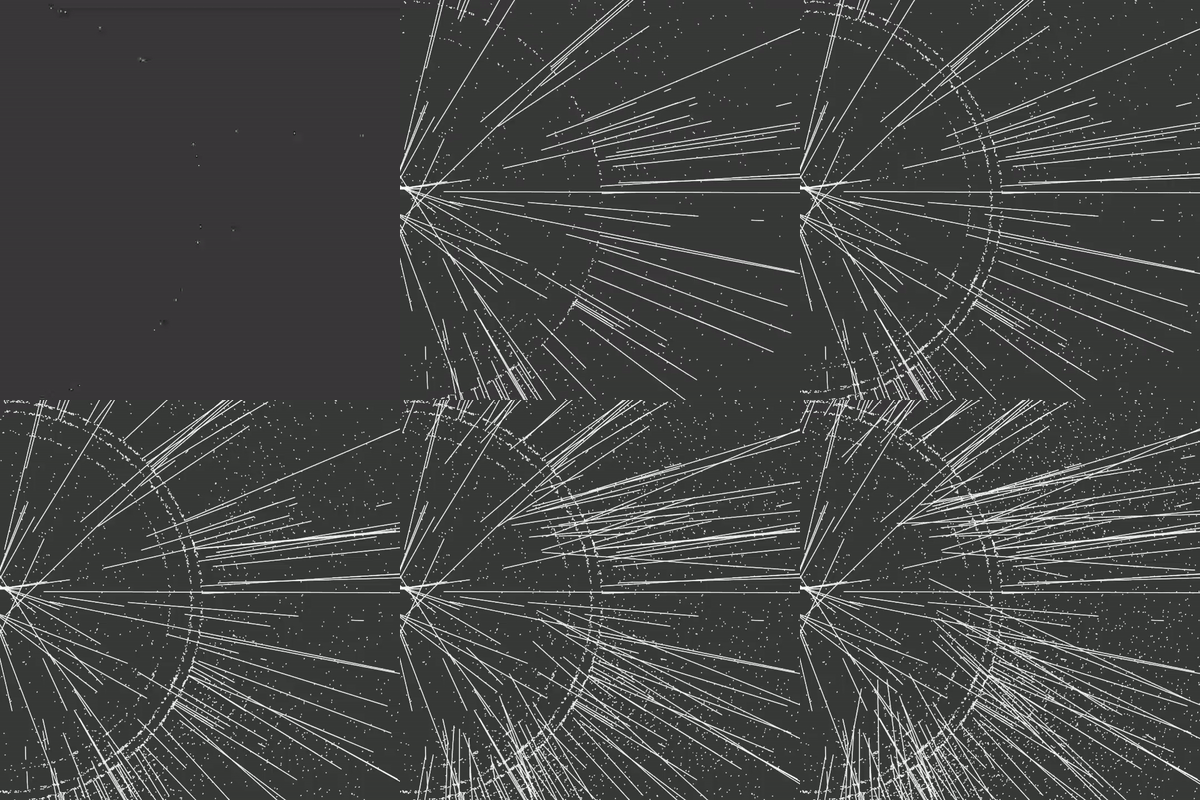
        Supernova — Exhibit A 
        <br><small>© Courtesy of the artist</small>
    </figcaption>
</figure>
<blockquote>
  <p>I was following a tutorial by Daniel Shiffman on angles and polar coordinates. In toolkits like Processing or Openframeworks there are functions called 'push' and 'pop' that allow you to change your coordinate systems temporarily. For example:</p>
<pre class="language-js"><code class="language-js">  xyz <span class="token comment">// global coordinates</span>
  <span class="token function">push</span><span class="token punctuation">(</span><span class="token punctuation">)</span> 
      xyz <span class="token comment">// temporal coordinates</span>
      <span class="token comment">/* Some code */</span> 
  <span class="token function">pop</span><span class="token punctuation">(</span><span class="token punctuation">)</span>
  xyz <span class="token comment">// global coordinates</span></code></pre>
  <p>My mistake was not adding a 'pop()' in my code, which caused my coordinates to be unpredictable.</p>
</blockquote>
<figure>
    <img 
        src="/blog/images/2023/happy-accidents/low/alex-02-low.gif" 
        data-src="/blog/images/2023/happy-accidents/alex-02.gif" 
        alt="Alex Torres' generative artwork animated" 
        loading="lazy" 
        draggable="false" 
        class="c-preloader lazyload"
        width="400">
    <figcaption class="c-caption">
        Supernova — Exhibit B 
        <br><small>© Courtesy of the artist</small>
    </figcaption>
</figure>
<blockquote>
  <p>For a few seconds, the patterns that were drawn reminded me of outlines of stars or planets, thus I exported my favorite frames as images [Exhibit A].</p>
  <p>In the video [Exhibit B], you can see how for a few seconds there are some interesting lines, and after that, it's a lot of chaos.</p>
</blockquote>
<h3>Dominique Schmitz</h3>
<p><a href="https://twitter.com/domizai_" target="_blank" rel="external noopener noreferrer" title="Dominique's Twitter Profile">@domizai_</a> is a Swiss graphic designer and generative artist living in Zurich.</p>
<figure>
    <img 
        src="/blog/images/2023/happy-accidents/low/dominique-01-low.gif" 
        data-src="/blog/images/2023/happy-accidents/dominique-01.gif" 
        alt="Dominique Schmitz's generative artwork animated" 
        loading="lazy" 
        draggable="false" 
        class="c-preloader lazyload"
        width="400">
    <figcaption class="c-caption">
        Partitioning 
        <br><small>© Courtesy of the artist</small>
    </figcaption>
</figure>
<blockquote>
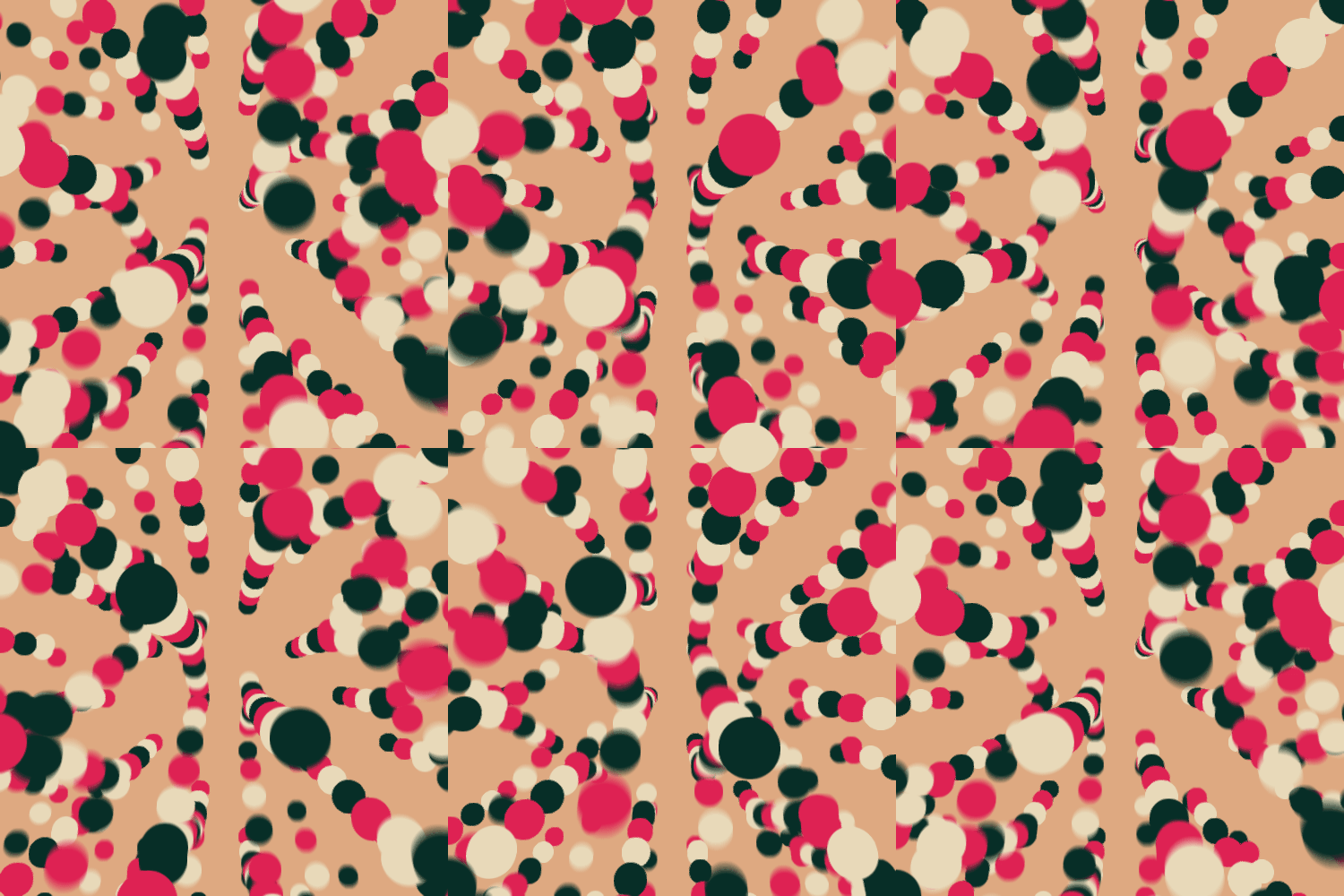
  <p>This is a WebGL shader running on observablehq. The accident are the occasional flickers and flares. The effect is subtle. But I found it quite interesting, that I kept it. My guess is that it has something to do with texture wrapping. But I'm really not sure why this is happening. I haven't even tried to fix it to this day.</p>
</blockquote>
<figure>
    <img 
        src="/blog/images/2023/happy-accidents/low/dominique-02-low.gif" 
        data-src="/blog/images/2023/happy-accidents/dominique-02.gif" 
        alt="Dominique Schmitz's generative artwork animated" 
        loading="lazy" 
        draggable="false" 
        class="c-preloader lazyload"
        width="400">
    <figcaption class="c-caption">
        Water Ripple 
        <br><small>© Courtesy of the artist</small>
    </figcaption>
</figure>
<blockquote>
  <p>I haven't coded anything for quite a while. I ended up watching a video of Daniel Shiffman doing this water ripple effect. It amazed me considerably that it motivated me to reproduce it. Instead of using Processing, I wanted to recreate it as a shader using OpenFrameworks.</p>
  <p>The accident is the trail effect. At the time, I hadn't done much with shaders, everything was fairly new to me. By mistake, I added some varying values to the alpha channels that behaved in an unexpected way. Quite unspectacular actually, but an accident nonetheless.</p>
</blockquote>
<h3>Daniel Velasquez</h3>
<p><a href="https://twitter.com/Anemolito" target="_blank" rel="external noopener noreferrer" title="Daniel's Twitter Profile">@Anemolito</a> is a Venezuelan creative developer based in Miami.</p>
<figure>
    <img 
        src="/blog/images/2023/happy-accidents/low/daniel-01-low.gif" 
        data-src="/blog/images/2023/happy-accidents/daniel-01.gif" 
        alt="Daniel Velasquez's generative artwork animated" 
        loading="lazy" 
        draggable="false" 
        class="c-preloader lazyload"
        width="400">
    <figcaption class="c-caption">
        Highs and Lows — Exhibit A
        <br><small>© Courtesy of the artist</small>
    </figcaption>
</figure>
<blockquote>
  <p>This render reminded me a lot of what you told me about happy accidents because it had many highs and lows, and it reminded me to be patient with the process. To begin with, it didn't have much direction. I started moving some spheres around, and this first render [Exhibit A] came out, which I'm not a big fan of.</p>
  <p>Then, frustrated with the result, I tried to continue exploring, and I came to a cube of spheres that didn't encourage me much and discouraged me because I didn't know what to do and nothing I liked was coming out.</p>
</blockquote>
<figure>
    <img 
        src="/blog/images/2023/happy-accidents/low/daniel-02-low.gif" 
        data-src="/blog/images/2023/happy-accidents/daniel-02.gif" 
        alt="Daniel Velasquez's generative artwork animated" 
        loading="lazy" 
        draggable="false" 
        class="c-preloader lazyload"
        width="400">
    <figcaption class="c-caption">
        Highs and Lows — Exhibit B
        <br><small>© Courtesy of the artist</small>
    </figcaption>
</figure>
<blockquote>  
  <p>Lastly, in my frustration, I started to rotate the camera pointlessly while I was thinking of abandoning this render and doing something else, but suddenly I found this moving image [Exhibit B] that I totally adore.</p>
  <p>I was very surprised, the one thing that totally frustrated me was a few accidental camera moves away from being one of my favorites.</p>
</blockquote>
<h3>Tim Pietrusky</h3>
<p><a href="https://twitter.com/NERDDISCO" target="_blank" rel="external noopener noreferrer" title="Tim's Twitter Profile">@NERDDISCO</a> is a German digital artist, open-source developer, and mentor living in Hesse.</p>
<p></p>
<noscript>
  <img 
    src="/blog/images/2023/happy-accidents/tim.jpg" 
    alt="Tim's audio-reactive visual video frame" 
    draggable="false" 
    width="800" 
    height="400"
    class="c-preloader">
</noscript>
<div class="video-player c-preloader">
  <iframe 
    width="800" 
    height="400"
    frameborder="0" 
    src="https://www.youtube-nocookie.com/embed/WAdhcOY8jxw?playlist=WAdhcOY8jxw&loop=1&color=white&modestbranding=1&iv_load_policy=3&rel=0" 
    title="Tim's audio-reactive visual video" 
    origin="https://www.ilithya.rocks/"
    allow="accelerometer; autoplay; clipboard-write; encrypted-media; gyroscope; picture-in-picture; web-share" 
    allowfullscreen>
  </iframe>
</div>
<span class="c-caption">
  Impossible Box 
  <br><small>© Courtesy of the artist</small>
</span>
<p></p>
<blockquote>
  <p>My goal for Impossible Box was to combine audio data (FFT) with my GLSL shader that was using three boxes (sdBox). While trying to get the audio data into the boxes, I used FFT as a value in each parameter of the box (e.g. width, height, and length). And it turned out that if you use a negative value for the length of the box, the box will disappear.</p>
  <p>I combined this technique with a certain threshold where only high frequencies will make the box disappear for the specific pixel that is generated (as we are in the shader world, the code runs for each pixel).</p>
  <p>My happy accident here was combining audio data with the parameters of a function that draws a 3D box in GLSL. This created a nice effect — I was surprised that parts of the box vanish when the value is negative.</p>
</blockquote>
<h3>Sam Wray</h3>
<p><a href="https://twitter.com/_2xAA" target="_blank" rel="external noopener noreferrer" title="Tim's Twitter Profile">@_2xAA</a> is an English creative developer, digital artist, musician, and visual artist living in London.</p>
<p></p>
<noscript>
  <img 
    src="/blog/images/2023/happy-accidents/sam.jpg" 
    alt="Sam's JSConf EU visual test photo from 2018" 
    draggable="false" 
    width="800" 
    height="400"
    class="c-preloader">
</noscript>
<div class="video-player c-preloader">
  <iframe 
    width="800" 
    height="400"
    frameborder="0" 
    src="https://www.youtube-nocookie.com/embed/MYfhNUSBtyY?playlist=MYfhNUSBtyY&loop=1&color=white&modestbranding=1&iv_load_policy=3&rel=0" 
    title="Sam's JSConf EU visual test video from 2018" 
    origin="https://www.ilithya.rocks/"
    allow="accelerometer; autoplay; clipboard-write; encrypted-media; gyroscope; picture-in-picture; web-share" 
    allowfullscreen>
  </iframe>
</div>
<span class="c-caption">
  JSConf EU 2018 Visual Test
  <br><small>© Courtesy of the artist</small>
</span>
<p></p>
<blockquote>
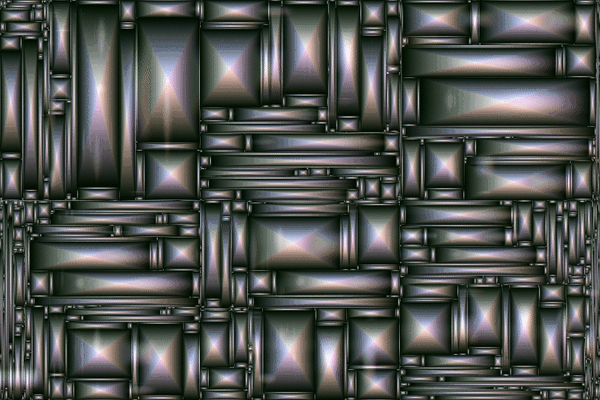
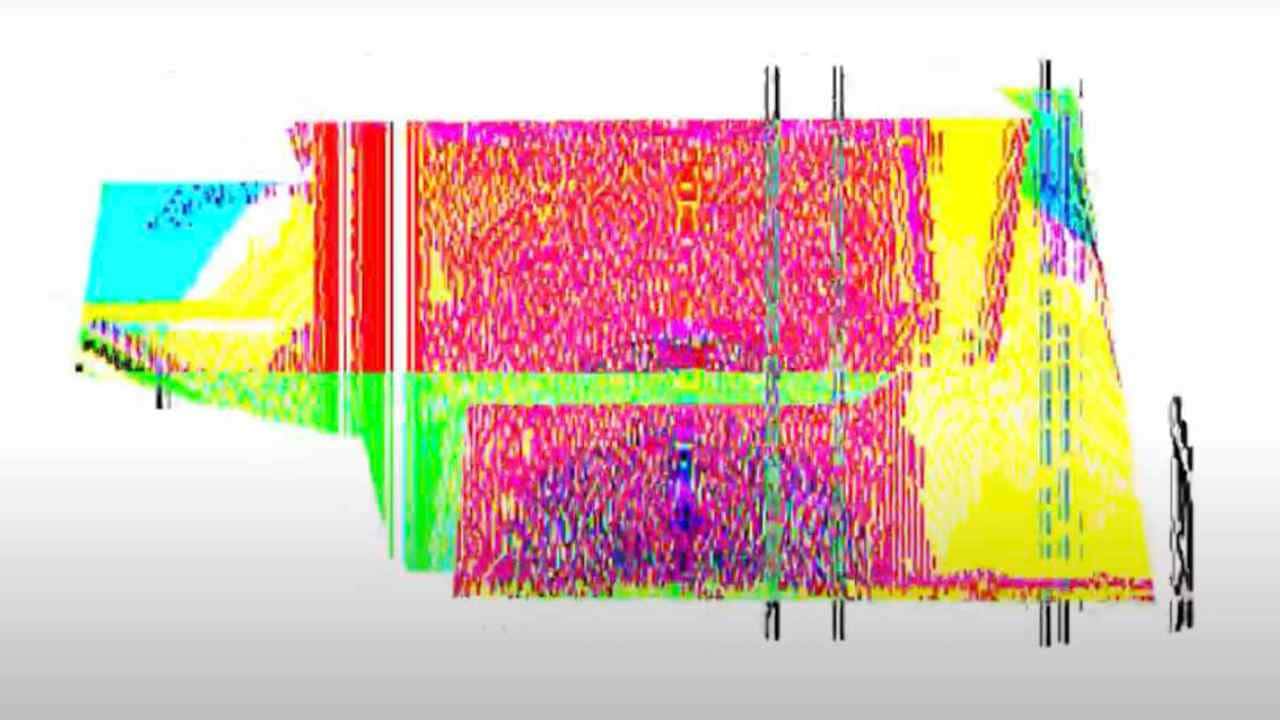
  <p>In this visual, my happy accident was that I could never make this effect again. I had no idea what combinations of things I did to ever get this result. I've gotten slightly close, but it hasn't been exact — the text having that precise amount of displacement with the rest of the color.</p>
  <p>When I work with visuals, almost everything I do is improvised. I rarely prepare anything before going to a gig, unless I'm specifically asked by the artist. Otherwise, I'm always improvising, and very rarely I have anything prepared.</p>
  <p>The more I do, the more I know what works and what doesn't, and less happy accidents might arise, but this was 2018, and anyways, improvisation means not only doing what I know, but also trying new unknown parameters.</p>
</blockquote>
    ]]></content>
    </entry>
	
    
    <entry>
      <title>#streetshaders</title>
      <link href="https://www.ilithya.rocks/blog/streetshaders/"/>
      <updated>2022-08-08T00:00:00Z</updated>
      <id>https://www.ilithya.rocks/blog/streetshaders/</id>
      <content type="html"><![CDATA[
      <img src="https://www.ilithya.rocks/images/ilithya-rocks-v3.jpg" alt="Screenshot of ilithya.rocks homepage">   
      <p>About a week ago I started a journey into a personal project that has been on my mind for about three years now, but procrastinated it often, until I didn't anymore.</p>
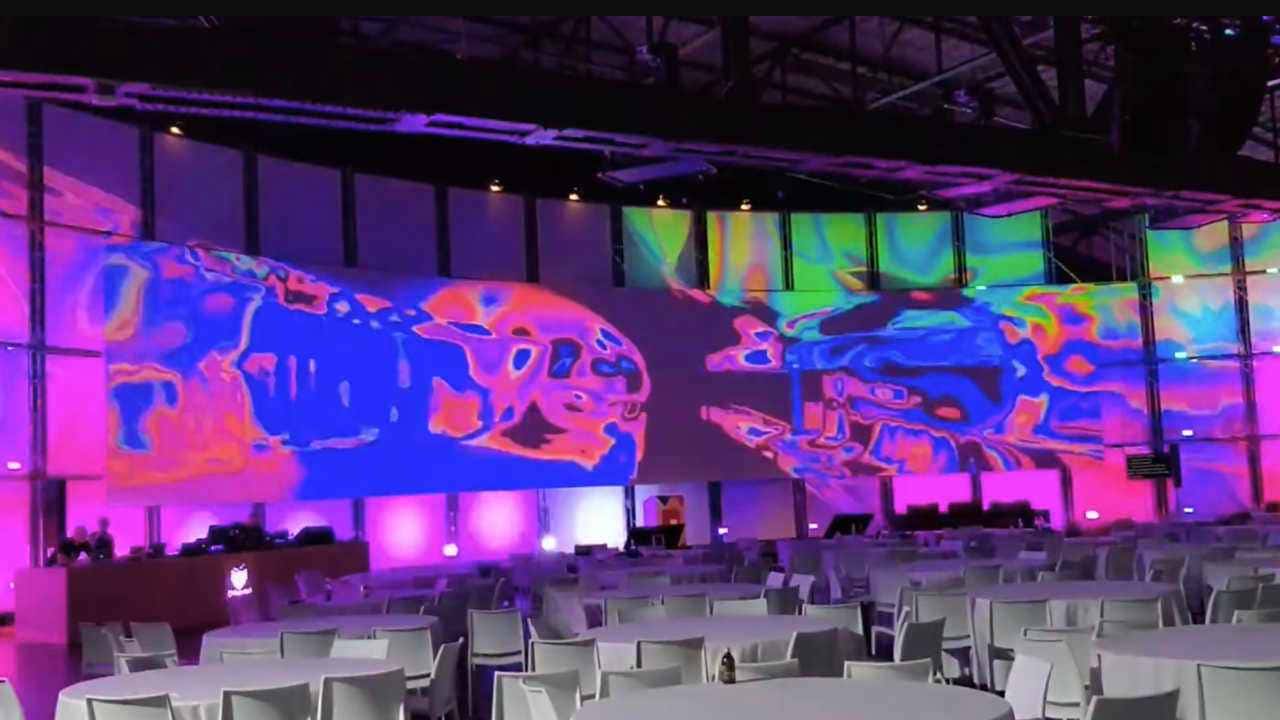
<p>I want to mix my love for street art and <abbr title="OpenGL Shading Language">GLSL</abbr> shaders in a way, and see where such explorations would go.</p>
<p>I think I'll call it and use the hashtag <code>#streetshaders</code>, as the idea is to make random projections of my shader artworks around the city streets.</p>
<p>Maybe there'll be only a few appearances and street take overs... maybe there'll be more than a few? Maybe it'll be material for something new. 🌱</p>
<p>Follow the hashtag:</p>
<ul>
<li><a href="https://www.instagram.com/explore/tags/streetshaders/" target="_blank" rel="external noopener noreferrer">Instagram — <code>#streetshaders</code></a></li>
<li><a href="https://twitter.com/search?q=streetshaders&src=typeahead_click&f=live" target="_blank" rel="external noopener noreferrer">Twitter — <code>#streetshaders</code></a></li>
</ul>

    ]]></content>
    </entry>
	
    
    <entry>
      <title>#anydayshaders twitter bot</title>
      <link href="https://www.ilithya.rocks/blog/anydayshaders-twitter-bot/"/>
      <updated>2021-02-23T00:00:00Z</updated>
      <id>https://www.ilithya.rocks/blog/anydayshaders-twitter-bot/</id>
      <content type="html"><![CDATA[
      <img src="https://www.ilithya.rocks/images/ilithya-rocks-v3.jpg" alt="Screenshot of ilithya.rocks homepage">   
      <p>I deployed my first twitter bot two days ago, and I thought of sharing my learnings in case someone else is also curious about it and the reasons behind why I did it.</p>
<p>If you prefer to skip my motives for making a twitter bot, go to the <a href="#how-to-make-a-twitter-bot">resources directly</a>.</p>
<h3>Why make a twitter bot?</h3>
<p>Last year, in April 2020, I created a <a href="/blog/anydayshaders/">challenge for myself</a> to learn <abbr title="OpenGL Shading Language">GLSL</abbr> shaders. I came up with a hashtag to use while I shared my learnings and invited my twitter peeps to join.</p>
<p>At the end of the summer, a few peers and new people joined the challenge, and I thought it'll be cool to gather all of those creations people were sharing somewhere. In addition to keeping track of how many people were joining the challenge.</p>
<p>If new people continue joining the challenge in the future, it'll be nice to have a place to talk to them. To kind of build a small community around it <em>[yep, I'm a community-oriented person]</em>.</p>
<p>Making a twitter bot to retweet the tweets using the <code>#anydayshaders</code> hashtag on twitter came to my mind, as at the same time, I was always intrigued about how one could program one of those bots.</p>
<p>Time to kill two birds with one stone <em>[no birds were harmed while writing this blog post]</em>.</p>
<p>Maybe others like me want to see what individuals are doing with shaders to be inspired and might want to follow such a twitter account instead of clicking on the hashtag.</p>
<h3>How to make a twitter bot?</h3>
<p>Luckily, we're living in an era where the Internet has tons of resources whenever we want to learn something new.</p>
<p>To make a twitter bot, I didn't ask any of my developer friends for advice, but instead, I googled it. To be precise I <em>deved</em> it.</p>
<p>No need to browse <em>deved</em> in the dictionary, because I made up this word as I was writing this post. When I said <em>deved</em> I meant I searched in <a href="https://dev.to/" target="_blank" rel="external noopener noreferrer" title="A community of amazing developers.">dev.to</a>.</p>
<p>I found several amazing resources to write a twitter bot that retweets tweets from a hashtag with JavaScript and deploy it for free with a <a href="https://www.heroku.com" target="_blank" rel="external noopener noreferrer" title="Cloud Application Platform.">Heroku</a> server.</p>
<p>I'll break the process into three steps.</p>
<h3>Make a twitter bot — step #1</h3>
<p>First thing to do before you even start writing your bot is to apply for a <a href="https://developer.twitter.com/en/apply-for-access" target="_blank" rel="external noopener noreferrer">developer twitter account</a> and create a <a href="https://developer.twitter.com/en/docs/projects/overview" target="_blank" rel="external noopener noreferrer">project app</a>.</p>
<p>It might take a day or more before your project is approved, and you can move on with getting the access keys you'll need to use the twitter API. A post by <a href="https://dev.to/seema1711/making-a-twitter-bot-with-python-3ld7" target="_blank" rel="external noopener noreferrer" title="Dev post — Making a Twitter bot with Python">Seema Saharan</a> was helpful during this step.</p>
<h3>Make a twitter bot — step #2</h3>
<p>Choose the programming language in which you want to write your twitter bot. I went for JavaScript, but Phyton seems popular as well.</p>
<p>Please be kind and remember that if you also decide to create a twitter bot, as Stan Lee wrote for one of his characters, <em>“With great power comes great responsibility.”</em></p>
<p>I'm no spiderman fan whatsoever and stole that quote from one of the resources I found on making a Twitter bot by <a href="https://dev.to/benhayehudi/how-i-created-two-twitter-bots-a97" target="_blank" rel="external noopener noreferrer" title="Dev post — How I Created Two Twitter Bots">Ben Greenberg</a>.</p>
<p>What I liked the most from this resource was learning to create environment variables. Such variables will store safely the access keys we got from our developer twitter account. And avoid having them publicly in a JavaScript file.</p>
<pre><code>export consumer_key=YOUR KEY HERE
export consumer_secret=YOUR SECRET KEY HERE
export access_token=YOUR TOKEN HERE
export access_token_secret=YOUR ACCESS TOKEN SECRET HERE
</code></pre>
<p>The second useful resource I found during this step was by <a href="https://dev.to/sumedhpatkar/how-i-created-a-twitter-bot-using-node-js-and-heroku-368b" target="_blank" rel="external noopener noreferrer" title="Dev post — How to create a Twitter Bot using Node.js and Heroku">Sumedh Patkar</a>. The main interesting piece of advice from this post was learning to avoid duplication of retweets with a little helper function and some extra JavaScript code.</p>
<pre class="language-js"><code class="language-js"><span class="token comment">// Utility function - Gives unique elements from an array</span>
<span class="token keyword">function</span> <span class="token function">uniqueTweets</span><span class="token punctuation">(</span><span class="token parameter">value<span class="token punctuation">,</span> index<span class="token punctuation">,</span> self</span><span class="token punctuation">)</span> <span class="token punctuation">{</span>
  <span class="token keyword">return</span> self<span class="token punctuation">.</span><span class="token function">indexOf</span><span class="token punctuation">(</span>value<span class="token punctuation">)</span> <span class="token operator">===</span> index<span class="token punctuation">;</span>
<span class="token punctuation">}</span>

<span class="token comment">/* More JS */</span>

<span class="token comment">// Get unique entries</span>
tweetIDList <span class="token operator">=</span> tweetIDList<span class="token punctuation">.</span><span class="token function">filter</span><span class="token punctuation">(</span>uniqueTweets<span class="token punctuation">)</span><span class="token punctuation">;</span></code></pre>
<h3>Make a twitter bot — step #3</h3>
<p>Last step is deploying our twitter bot and let it run by itself, working like a charm.</p>
<p>Both of the previous resources show how to deploy the bot in Heroku with a free account. I followed their advice and can recommend the same.</p>
<p>Make an account in <a href="https://www.heroku.com" target="_blank" rel="external noopener noreferrer" title="Cloud Application Platform.">Heroku</a> and create an app where you'll have your bot. The post by <a href="https://dev.to/sumedhpatkar/how-i-created-a-twitter-bot-using-node-js-and-heroku-368b" target="_blank" rel="external noopener noreferrer" title="Dev post — How to create a Twitter Bot using Node.js and Heroku">Sumedh Patkar</a> goes more into detail about the whole setup.</p>
<p>You might need to write some Heroku commands in your terminal, so make sure you install the Heroku CLI in your system.</p>
<p>I have macOS and brew, so I made the install with this terminal command:</p>
<pre><code>brew tap heroku/brew &amp;&amp; brew install heroku
</code></pre>
<p>If you have a different environment, read about your setup in the <a href="https://devcenter.heroku.com/articles/heroku-cli?ref=hackernoon.com" target="_blank" rel="external noopener noreferrer">Heroku CLI docs</a>.</p>
<p>Once your bot is successfully deployed and working, you can view it in your <a href="https://dashboard.heroku.com/apps" target="_blank" rel="external noopener noreferrer">Heroku dashboard</a>. Remember that your <code>web dyno</code> should be <em>OFF</em>, and your <code>worker dyno</code> should be <em>ON</em>.</p>
<p>One thing I found useful after I deployed my bot was <a href="https://devcenter.heroku.com/articles/git-clone-heroku-app" target="_blank" rel="external noopener noreferrer" title="Git Cloning Existing Heroku Applications">cloning the Heroku repo</a>. I had previously made a personal GitHub repo for it when I created the bot.</p>
<p>With the Heroku repo on my computer, I made a small update in my JavaScript file and kept better track of the last deployed changes.</p>
<h3>Wrapping up</h3>
<p>That's it! My twitter bot is alive. You can view it at <a href="https://twitter.com/anydayshaders_" target="_blank" rel="external noopener noreferrer" title="Twitter account for #anydayshaders">@anydayshaders_</a></p>
<p>If you thought I might have skipped some steps to create a Twitter bot, I didn't. I purposely wrote the steps that way and linked all the resources I used, highlighting what I thought most important to know.</p>
<p>I felt there's no need for me to copy and paste again what those resources I'm pointing to are already giving us. I preferred to guide you through it, revisit what I learned, and hope that if you're also curious to experiment in making a twitter bot, you'll use that power with responsibility. ✌🏽</p>
<p>References:</p>
<ul>
<li><a href="https://developer.twitter.com/en/apply-for-access" target="_blank" rel="external noopener noreferrer">Developer Twitter Account</a></li>
<li><a href="https://developer.twitter.com/en/docs/projects/overview" target="_blank" rel="external noopener noreferrer">Twitter API — Projects Docs</a></li>
<li><a href="https://dev.to/seema1711/making-a-twitter-bot-with-python-3ld7" target="_blank" rel="external noopener noreferrer" title="Dev post by Seema Saharan">Making a Twitter bot with Python</a></li>
<li><a href="https://dev.to/benhayehudi/how-i-created-two-twitter-bots-a97" target="_blank" rel="external noopener noreferrer" title="Dev post by Ben Greenberg">How I Created Two Twitter Bots</a></li>
<li><a href="https://dev.to/sumedhpatkar/how-i-created-a-twitter-bot-using-node-js-and-heroku-368b" target="_blank" rel="external noopener noreferrer" title="Dev post by Sumedh Patkar">How to create a Twitter Bot using Node.js and Heroku</a></li>
<li><a href="https://devcenter.heroku.com/articles/heroku-cli?ref=hackernoon.com" target="_blank" rel="external noopener noreferrer">Heroku CLI Docs</a></li>
<li><a href="https://devcenter.heroku.com/articles/git-clone-heroku-app" target="_blank" rel="external noopener noreferrer">Git Cloning Existing Heroku Applications</a></li>
</ul>

    ]]></content>
    </entry>
	
    
    <entry>
      <title>My typical day</title>
      <link href="https://www.ilithya.rocks/blog/my-typical-day/"/>
      <updated>2021-02-06T00:00:00Z</updated>
      <id>https://www.ilithya.rocks/blog/my-typical-day/</id>
      <content type="html"><![CDATA[
      <img src="https://www.ilithya.rocks/images/ilithya-rocks-v3.jpg" alt="Screenshot of ilithya.rocks homepage">   
      <p>Last week <a href="https://matthiasott.com/notes/my-typical-day" target="_blank" rel="external noopener noreferrer" title="Matthias Ott Blog Post">Matthias Ott</a> tagged some others and me on a series of “My Typical Day” posts started by <a href="http://cdevroe.com/2021/01/07/my-typical-day/" target="_blank" rel="external noopener noreferrer" title="Colin Devroe's Blog Post">Colin Devroe</a>.</p>
<p>I enjoyed the ones I read and learning about people's routines and non-routines working in this tech bubble I'm part of as well.</p>
<p>You can find that first tweet <a href="https://twitter.com/cdevroe/status/1347181529819193344" target="_blank" rel="external noopener noreferrer" title="Colin Devroe's Tweet">here</a>.</p>
<p>I thought it was lovely to read people's posts in their personal blogs <em>[yeih, for indie blogs]</em>.</p>
<p>Inspired, I'll share bits of my typical day.</p>
<h3>The freelance life</h3>
<p>First of all, these days, my typical day in a working week is rarely the same.</p>
<p>Unless I'm booked for a period somewhere with a team, I work on my own.</p>
<p>When I work with a team, I tend to have a routine given that I must work with my colleagues, have dailies, participate in meetings, etc. If so, my working schedule is roughly in between 9:00 — 10:00 to 17:00 — 18:00. And my morning and evening activities outside work are prone to be similar too.</p>
<p>Nevertheless, since I started freelancing, I seldom work more than six months in a year with a team.</p>
<p>Recently, I've worked mostly by myself, so I thought of sharing more details about this period.</p>
<h3>Schedule on a working week</h3>
<p>My typical day varies from day to day. I don't have a steady routine, but I have some habits.
<br><br></p>
<ul>
<li><em>9:00 — 11:00</em>. Rise and shine. I wake up at some point in this time slot. I ain't nothing of an early bird. Kudos to everyone who is. I wished I could start my day earlier sometimes, but it's a struggle as I'm a night owl. First habit of the day — breakfast. Porridge with greek yogurt, a dash of milk, blueberries <em>[give me antioxidants]</em>, apple, and another fruit. Oh, don't forget a latte macchiato with foamy oat milk. Second habit of the day — a ten-minute stretch.</li>
</ul>
<p>The following daily time slots begin to blur because here is where the routine breaks. Instead, I have activity slots, similar to <a href="https://www.sarasoueidan.com/desk/typical-day/" target="_blank" rel="external noopener noreferrer" title="Sara Soueidan Blog Post">Sara Soueidan's</a> activity blocks.
<br><br></p>
<ul>
<li>A short walk with my neighbor and her dog after lunch.</li>
<li>A twenty-minute light <s>yoga</s> stretching. It's a habit since last summer.</li>
<li>Browse for design trends and digital art for inspiration.</li>
<li>Do parts of an online course for some hours.</li>
<li>Drink a homemade matcha latte with foamy oat milk. Maybe a cookie or two.</li>
<li>Meditation walk for one or two hours in the park or the city. Walk between five to eight k.m. while listening to a podcast, music, or my thoughts. Another habit.</li>
<li>Read news or posts about creative/front-end development, design, and digital art.</li>
<li>Remote meeting with a client to discuss project development.</li>
<li>Take half an hour or an hour for a lunch break alone or with my partner.</li>
<li>Work and experiment on my digital art <em>[shaders, lately]</em> for some hours.</li>
<li>Work and experiment on my creative/front-end learnings and design with a personal creative project for some hours.</li>
<li>Work on a client project for some hours.</li>
</ul>
<p>I mix and match those activities during my day before dinner time. Don't do all of them every day. But try to do <s>yoga</s> stretching and meditation walks almost daily. I might do one activity twice during my day, like working on a client project or digital art, but with a break after every two hours.</p>
<p>My mood and mental health influence my daily schedule as well. If I'm having a bad day or not feeling productive, I most likely won't do much of the <em>'working part'</em> on the previous list of activities. Instead, I'd probably do other leisure activities.</p>
<p>If I'm having a good day but feel like having a Sunday on a Tuesday, I also don't work at all, as long as I don't have any client projects or deadlines and alternatively focus on other hobbies or personal affairs.
<br><br></p>
<ul>
<li><em>19:00 — 21:00</em>. Dinner time at some point. Some days either my partner or I cook. Some days we order take out [we're currently addicted to salad bowls].</li>
</ul>
<p>Next time slots are also a blur and a case of mix and match.
<br><br></p>
<ul>
<li>Leisure time with my partner. Watch some TV — News, Netflix, YouTube. Whatever strikes the mood. Maybe play some Nintendo Switch.</li>
<li>Online call with a friend or family <em>[life of an expat]</em>.</li>
<li>Play with digital art <em>[yep, probably shaders]</em>.</li>
<li>Read a book for at least thirty minutes.</li>
<li>Take a bubble and salts bath <em>[my mind and back are happy]</em> while listening to a podcast or watching Netflix.</li>
<li>Take a midnight walk with my partner. Maximum for an hour. We started doing this activity after the pandemic hit. We're both night owls, and I love to wander in the city when everybody is sleeping or cozy at home. I feel like a vampire going out in the darkness and finding almost no one in the streets at that time, especially during the winter.</li>
</ul>
<p>Last activity of the day. ✨
<br><br></p>
<ul>
<li><em>24:00 — 02:00</em>. Sleep tight. Try to read a bit offline or online before zoning out.</li>
</ul>
<h3>Closing notes</h3>
<p>I probably didn't mention some activity slots that might come up some days. But I wanted to highlight how unpredictable my working days can be, as I don't think of myself as a routine person.</p>
<p>Routines for a long time bring me down. Uncertainty, spontaneity, and wonder light me up.</p>
<p>Thanks for giving me a reason to write my first blog post of this month, <a href="https://twitter.com/m_ott/" target="_blank" rel="external noopener noreferrer" title="Matthias Ott's Twitter Profile">@m_ott</a>.</p>
<p>If you made it until here, haven't written about your typical day, and feel like sharing, I'll be happy to read it! Tag me on <a href="https://twitter.com/ilithya_rocks/" target="_blank" rel="external noopener noreferrer" title="ilithya's Twitter Profile">twitter</a> if you do.</p>

    ]]></content>
    </entry>
	
    
    <entry>
      <title>New year, new dreams</title>
      <link href="https://www.ilithya.rocks/blog/new-year-new-dreams/"/>
      <updated>2021-01-02T00:00:00Z</updated>
      <id>https://www.ilithya.rocks/blog/new-year-new-dreams/</id>
      <content type="html"><![CDATA[
      <img src="https://www.ilithya.rocks/images/ilithya-rocks-v3.jpg" alt="Screenshot of ilithya.rocks homepage">   
      <p>Before I start speaking about new dreams, I want to touch on how far my journey has gotten in one year since I officially deviated career paths <em>[only a bit]</em> again.</p>
<p>2020 was a weird year. Many times I felt I was living inside one of those sci-fi films set in the future. The one thing I never imagined I'll get to witness.</p>
<p>When 2020 started, I've had the worst two years of my life and was looking forward to that year to return feeling normal after a successful fight. I guess life had different plans, and I have to wait a bit longer.</p>
<p>I am hopeful for this new year of 2021 that the world around all of us, even if slowly, heals.</p>
<p>On the bright side, despite such events, there were tons of positive happenings around my life. Let's talk about the career-wise ones.</p>
<p>Looking back at what I had hope <a href="/blog/new-year-new-site/">beginning of 2020</a> when I rebranded myself and relaunched this site, I had these dreams:</p>
<blockquote>
  <p>I look forward to working in more artistic endeavors in the future. Whether it is making cool websites or creating digital visuals and installations for art + tech events, galleries, museums, musicians, fashion events, festivals, film industry, who knows? The sky is the limit.</p>
</blockquote>
<p>I'm happy to share that many of those dreams came to be true! :)</p>
<p>Artistically speaking, the year 2020 brought me a lot of light:
<br><br></p>
<ul>
<li>
<p><a href="https://codame.com/" target="_blank" rel="external noopener noreferrer">CODAME</a> invited me to join their <a href="https://codame.com/artists/ilithya/" target="_blank" rel="external noopener noreferrer" title="CODAME's artist profile">artist collective</a> in the summer. I started selling a couple of my digital artworks in their new shop and exhibited a few pieces in some of their <a href="https://www.instagram.com/p/CEcJ8QjhBnY/" target="_blank" rel="external noopener noreferrer" title="New Art City: Virtual Art Gallery Video">virtual galleries</a>.
<br><br></p>
</li>
<li>
<p>My video and visual art were exhibited in the Global Gallery by <a href="https://twitter.com/ilithya_rocks/status/1303717501025611777?s=20" target="_blank" rel="external noopener noreferrer">Ars Electronica + .ART</a> over the summer. I also exhibited artworks virtually in a few other places or events, from which if some are still online, I listed them on my <a href="/about/">about page</a>.
<br><br></p>
</li>
<li>
<p>Two new musicians contacted me and asked me to do visual artworks for their music. None of the deals settled, but I'd say it's a step forward if one of them found me on their own after browsing my <a href="https://www.instagram.com/ilithya_rocks/" target="_blank" rel="external noopener noreferrer" title="My Instagram Profile">instagram work</a>.
<br><br></p>
</li>
<li>
<p>I made an on and off collaboration throughout the summer with a local neo-grunge band, <a href="https://liottaseoul.com/" target="_blank" rel="external noopener noreferrer">LIOTTA SEOUL</a>, and created a series of <a href="https://vimeo.com/ilithya" target="_blank" rel="external noopener noreferrer" title="My Vimeo Profile">audio-reactive shader visuals</a> to some of their songs.
<br><br></p>
</li>
<li>
<p>My shader artwork was showcased in <abbr title="New York City">NYC</abbr> as part of an installation exhibit organized by <a href="https://lightbox.io/" target="_blank" rel="external noopener noreferrer">Lightbox</a> and <a href="https://www.instagram.com/creativecodeart/" target="_blank" rel="external noopener noreferrer" title="Creative Code Art's Instagram Profile">Creative Code Art</a> in the autumn. Sadly, I have no decent footage from it, so I cannot share this one.
<br><br></p>
</li>
<li>
<p>I made a performance at <a href="https://githubuniverse.com/2xAAs-chill-chiptune/" target="_blank" rel="external noopener noreferrer" title="Break performance at GitHub Universe">GitHub Universe</a> in the winter and collaborated with <a href="https://twitter.com/_2xAA" target="_blank" rel="external noopener noreferrer" title="Sam's Twitter Profile">@_2xAA</a> by creating a few audio-reactive shaders for his live chiptune music.
<br><br></p>
</li>
<li>
<p>I started an on-going collaboration with <a href="https://twitter.com/iamelizasj" target="_blank" rel="external noopener noreferrer" title="Eliza's Twitter Profile">@iamelizasj</a> in late August to create digital art while exploring shader code. Our chemistry and flow have worked out amazingly that our <abbr title="collaboration">collab</abbr> evolved organically, and we launched the premier of our <a href="https://www.twitch.tv/curiouslyminded" target="_blank" rel="external noopener noreferrer" title="curiously minded Twitch Channel">twitch channel</a> during CODAME's JOYNT festival in the winter. A replay of our first live stream it's on our brand new <a href="https://www.youtube.com/channel/UCBgyGoeyfuI4YK_Ltgrdycg" target="_blank" rel="external noopener noreferrer" title="curiously minded YouTube Channel">youtube channel</a>.
<br><br></p>
</li>
<li>
<p>I met incredible people from the creative coding community, either by reaching out to them or collaborating with them. Everyone I have stumbled upon until now it's been very supportive. Thank you to each one of you.
<br><br></p>
</li>
<li>
<p>I achieved making 100 shader artworks while learning <abbr title="OpenGL Shading Language">GLSL</abbr> shaders with my <code>#anydayshaders</code> <a href="/blog/100-anydayshaders/">challenge</a>.</p>
</li>
</ul>
<p>When it comes to my other two careers, creative development and design, I'm also glad for the achievements:
<br><br></p>
<ul>
<li>
<p>I won an award for mobile excellence and mobile site of the week at <a href="https://www.awwwards.com/mobile-sites/ilithya-rocks/" target="_blank" rel="external noopener noreferrer">awwwards</a> for this website, among other honor mentions and kudos listed on my <a href="/about/">about page</a>.
<br><br></p>
</li>
<li>
<p>I organized and gave the first <a href="https://www.vuevixens.org/" target="_blank" rel="external noopener noreferrer">Vue-Vixens</a> workshop to learn Vue.js in my local tech community with my friend and <abbr title="co-organizer">co-orga</abbr> <a href="https://twitter.com/burgmary" target="_blank" rel="external noopener noreferrer" title="Mary's Twitter Profile">@burgmary</a>, right before the pandemic started.
<br><br></p>
</li>
<li>
<p>I got my first 3D <abbr title="Web Graphics Library">WebGL</abbr>/installation freelance gig with <a href="https://sinnerschrader.com/" target="_blank" rel="external noopener noreferrer">Sinnerschrader</a> during the summer. Thank you so much to <a href="https://twitter.com/kotzendekrabbe" target="_blank" rel="external noopener noreferrer" title="Feli's Twitter Profile">@kotzendekrabbe</a> and <a href="https://twitter.com/hblank" target="_blank" rel="external noopener noreferrer" title="Holger's Twitter Profile">@hblank</a> for thinking of me. &lt;3
<br><br></p>
</li>
<li>
<p>GitHub contacted me in the autumn, and I made a short <a href="https://github.com/ilithya/abstract-sketches-p5js/" target="_blank" rel="external noopener noreferrer" title="Abstract Sketches p5.js tutorial repository">tutorial</a> on learning p5.js and generative art at their <a href="https://githubuniverse.com/speakers/ilithya/" target="_blank" rel="external noopener noreferrer" title="ilithya's speaker page at GitHub Universe 2020">GitHub Universe 2020</a>. Gosh, I was nervous as hell, so I speak at the speed of light, and I'm looking very serious in the video. 😂</p>
</li>
</ul>
<p>Now speaking about dreams for 2021, I mostly want to keep growing as a digital artist exploring the new media, which I feel combines some of my creative developer and designer skills, among my passion for many other spectrums of the art scene.</p>
<p>I still want to do much of what I desired last year, but going bigger. Go big or go home, right?</p>
<p>I hope to create more visuals for musicians. Maybe even collaborate in the making of a music video.</p>
<p>I desire to make more installation work. Maybe some of it with interactivity, or my new machine learning knowledge <em>[it's not here yet, but I plan to learn more of it this year]</em>.</p>
<p>I want to dive a bit into <abbr title="Virtual Reality">VR</abbr> and explore that part of 3D in the art + tech bridge.</p>
<p>I'm curious to make music with code. Not because I want to pursue being a musician, but I realized it's another way I can enhance my video or visual art without asking or searching for sounds elsewhere.</p>
<p>Definitively, I want to continue collaborating with other talented artists by learning, exploring, and creating together.</p>
<p>I wish to make more visual, video, and sound art. Whether it's still for art + tech events, festivals and galleries. But also would like to work with museums, fashion events, the film industry, and the list goes on.</p>
<p>For most of my life, my motto has been to <em>live for my dreams and die trying</em>. Like Alexander Supertramp from <em><a href="https://www.youtube.com/watch?v=XZG1FzyB8DI" target="_blank" rel="external noopener noreferrer" title="Into the Wild Movie Trailer">Into the Wild</a></em> said:<br>
“<em>If you want something in life, just reach out and grab it.</em>” ✌🏽</p>

    ]]></content>
    </entry>
	
    
    <entry>
      <title>100 #anydayshaders</title>
      <link href="https://www.ilithya.rocks/blog/100-anydayshaders/"/>
      <updated>2020-12-30T00:00:00Z</updated>
      <id>https://www.ilithya.rocks/blog/100-anydayshaders/</id>
      <content type="html"><![CDATA[
      <img src="https://www.ilithya.rocks/images/ilithya-rocks-v3.jpg" alt="Screenshot of ilithya.rocks homepage">   
      <p>Back in April I started a journey to explore creating my <abbr title="OpenGL Shading Language">GLSL</abbr> shaders and I wrote about it <a href="/blog/anydayshaders/">here</a>.</p>
<p>I created a little challenge for myself to keep me motivated, and with it, a hashtag called <code>#anydayshaders</code>.</p>
<p>In the past, I've tried other design and coding challenges and was never able to finish. At some point, I'd lose motivation because it sort of caused me stress.</p>
<p>By calling my challenge <code>anydayshaders</code> I figure I could create as many shaders as I wanted without a specific number as a goal. Also, without a specific schedule, that personally gives me stress before I even start, if I were told I need to do something daily or once a week in my free time.</p>
<p>Maybe it's only me, but it's interesting how sometimes each of us is wired. I say this because, in the end, I ended up having a schedule for my shader creations, but it was never the same. Some months I created once a week or every two weeks. Others twice a week. At the end of the year, I managed to even create two shaders a day for some weeks.</p>
<p>As you see, the way I work for my personal projects is that as long as I don't feel any pressure, I produce way more as I am relaxed and sincerely enjoying the ride.</p>
<p>I am happy to announce that I even managed to create <em>100 shaders</em> before the end of 2020! 🥳 Which for me, it's huge news, as I'd never felt accomplished with a public design or coding challenge before.</p>
<p>You can view all of my shader creations on my <a href="https://www.instagram.com/ilithya_rocks/" target="_blank" rel="external noopener noreferrer">instagram account</a>.</p>
<p>I'm sharing the code of a few shaders I produce on <a href="https://codepen.io/ilithya/pens/tags/?selected_tag=anydayshaders" target="_blank" rel="external noopener noreferrer" title="ilithya's shaders on CodePen.">CodePen</a>.</p>
<p>You can also see my shader creations by following the hashtag on these two social networks:</p>
<ul>
<li><a href="https://www.instagram.com/explore/tags/anydayshaders/" target="_blank" rel="external noopener noreferrer">Instagram — <code>#anydayshaders</code></a></li>
<li><a href="https://twitter.com/search?q=anydayshaders&src=typeahead_click&f=live" target="_blank" rel="external noopener noreferrer">Twitter — <code>#anydayshaders</code></a></li>
</ul>
<p>By browsing the hashtag on such social networks you'll also find the work from other online peeps who shared my excitement into practicing shaders.</p>
<p>Whether you're a shader newbie or pro, feel free to join us by using <code>#anydayshaders</code> with your creations and contribute to motivating each other.</p>
<p>My shader journey is not over yet, only for this year. Stay tuned next year, as I continue growing my shader skills with <code>#anydayshaders</code>.</p>
<p>References:</p>
<ul>
<li><a href="https://thebookofshaders.com/" target="_blank" rel="external noopener noreferrer" title="Book by Patricio Gonzalez Vivo and Jen Lowe">The Book of Shaders</a></li>
</ul>

    ]]></content>
    </entry>
	
    
    <entry>
      <title>Generative art</title>
      <link href="https://www.ilithya.rocks/blog/generative-art/"/>
      <updated>2020-08-14T00:00:00Z</updated>
      <id>https://www.ilithya.rocks/blog/generative-art/</id>
      <content type="html"><![CDATA[
      <img src="https://www.ilithya.rocks/images/ilithya-rocks-v3.jpg" alt="Screenshot of ilithya.rocks homepage">   
      <p>Last year we organized a meetup in the city where I reside about generative art.</p>
<p>I started such a meetup, <a href="https://twitter.com/codepenhamburg" target="_blank" rel="external noopener noreferrer">CodePen Hamburg</a>, back in 2016. Over the years, designer and developers friends I met in the local tech community have helped co-organize it.</p>
<p>I've been exploring generative art for approximately a year, and I'm currently in love with this craft.</p>
<p>I thought of sharing the small research I made back then, in addition to how I got started with generative art, in case someone wants to learn more regarding the topic or is new to it.</p>
<p>Before I explain what generative art is, narrate some of the origins, and point you to resources, I'd thought of sharing how I first got interested in generative art.</p>
<p>If you prefer to skip my story, go to the section that interests you directly:</p>
<ul>
<li><a href="#what-is-generative-art">What is generative art?</a></li>
<li><a href="#when-did-generative-art-begin">When did generative art begin?</a></li>
<li><a href="#how-i-got-started-with-generative-art">How I got started with generative art?</a></li>
<li><a href="#what-tools-are-available-for-generative-art">What tools are available for generative art?</a></li>
</ul>
<h3>What sparked my interest in generative art?</h3>
<p>I cannot recall hearing of generative art, before my very good friend — <a href="https://twitter.com/_ok_bai" target="_blank" rel="external noopener noreferrer" title="Asja's Twitter Profile">@_ok_bai</a> told me about it.</p>
<p>At the end of 2018, she shared with me she discovered the world of creative coding, and that she wanted to learn coding to create visuals and generative art. I was excited she wanted to code! I could now teach and talk code with a dear friend.</p>
<p>Once she explained more of it and showed me the creations of a few artists, I was hooked.</p>
<p>I realized I've seen and experienced generative art all my life since I was a teenager, and I had no clue it had a name. Before knowing what it was, I'd call it abstract art.</p>
<p>I've seen generative art while attending concerts in the form of visuals for musicians. I've seen video art, posters, and paintings based on generative art in coffee shops, galleries, and museums. I've seen GIFs and video art of generative art on the web and TV... and yet, I had no idea it was a thing!</p>
<p>It's most likely I heard of generative art in the past, but I didn't pay attention. My interest was somewhere else that only recently I felt I discovered it.</p>
<h3>What is generative art?</h3>
<p>I like how <a href="https://joshuadavis.com/" target="_blank" rel="external noopener noreferrer" title="personal Website">Joshua Davis</a> summarizes it in the trailer of his <a href="https://www.skillshare.com/classes/Programming-Graphics-I-Introduction-to-Generative-Art/782118657" target="_blank" rel="external noopener noreferrer" title="Joshua Davis Skillshare Class">class</a>:</p>
<p>“<em>Generative art is making art mainly driven by a computer program. Being able to look at the screen and have the composition make decisions out of gesture. A system for generating an infinite number of random compositions.</em></p>
<p><em>The artwork generated in the end, it's unique to the individual creating it, because they've made all the decision-making within the parameters.</em>”</p>
<p>So generative art is an algorithmic art, computer art, a kind of art that always introduces randomness as part of its creation process. A place where geometry, abstraction, spontaneousness and chance meet. An artistry where chaos and happy accidents are embraced.</p>
<p>It has been said that generative art is highly influenced by modern art from the early-20th-century:</p>
<ul>
<li>Abstract Expressionism</li>
<li>Bauhaus</li>
<li>Constructivism</li>
<li>Cubism</li>
<li>Dada</li>
<li>Futurism</li>
<li>Surrealism</li>
</ul>
<p>Reference:</p>
<ul>
<li><a href="https://www.artnome.com/news/2018/8/8/why-love-generative-art" target="_blank" rel="external noopener noreferrer" title="Artnome post by Jason Bailey">Why Love Generative Art?</a></li>
</ul>
<h3>When did generative art begin?</h3>
<p>[preface] I wouldn't be able to share a bit of generative art history without existing resources. If you want to read in detail the beginnings of generative art, make sure to go to the links in the references. A lot of the words written in this part are not mine but adapted from the resources.</p>
<p>The first wave of generative artists emerged in the '60s and '70s when computers had no monitors, and the artwork created was shared by printing the art on plotters.</p>
<p>Some of the artists emerging from this era are:</p>
<ul>
<li>Frieder Nake</li>
<li>Georg Nees</li>
<li>Ken Knowlton</li>
<li>Lillian Schwartz</li>
<li>Michael Noll</li>
<li>Vera Molnár</li>
</ul>
<p>In the late '90s, <a href="https://maedastudio.com/" target="_blank" rel="external noopener noreferrer" title="personal website">John Maeda</a> started <a href="https://mitpress.mit.edu/books/design-numbers" target="_blank" rel="external noopener noreferrer" title="Book">Design By Numbers</a>. A project in which he created and shared a computational process, allowing artists, designers, and other non-programmers to start with computer programming.</p>
<p>In 2001 <a href="https://www.benfry.com/" target="_blank" rel="external noopener noreferrer" title="personal website">Ben Fry</a> and <a href="https://reas.com/" target="_blank" rel="external noopener noreferrer" title="personal website">Casey Reas</a> built a free platform called <a href="https://processing.org/" target="_blank" rel="external noopener noreferrer" title="software website">Processing</a>. A software inspired after working together as students with Maeda in <em>Design By Numbers</em>.</p>
<p><em>Processing</em> is aimed at anyone with an interest in learning to sketch with programming. It makes generative art accessible to anyone in the world with access to a computer. One doesn't need to be a computer scientist or developer to create sketches and art with code.</p>
<p>The born of <em>Processing</em> has extremely influenced the growth of generative art over the last two decades.</p>
<p>Over the years, many software and tools have risen inspired by this open-source movement and generative art.</p>
<p>References:</p>
<ul>
<li><a href="https://www.artnome.com/news/2018/8/8/why-love-generative-art" target="_blank" rel="external noopener noreferrer" title="Artnome post by Jason Bailey">Why Love Generative Art?</a></li>
<li><a href="https://en.wikipedia.org/wiki/John_Maeda" target="_blank" rel="external noopener noreferrer" title="Wikipedia">John Maeda</a></li>
</ul>
<h3>How I got started with generative art?</h3>
<p>[<em>preface</em>] There are a lot of resources out there pointing to places for learning generative art. I am sharing here the links to the ones I've found helpful. This doesn't mean they're the best or only resources. Every person learns differently. Take this list of recommendations with a grain of salt.</p>
<p>One YouTube channel helped me getting started with generative art and creative coding using the p5js library:</p>
<ul>
<li><a href="https://www.youtube.com/user/shiffman" target="_blank" rel="external noopener noreferrer" title="YouTube Channel">The Coding Train</a></li>
</ul>
<p>I find useful a little website by Ruth John and Tim Holman, with both, tutorials and a podcast to tune in about all generative art-related — <a href="https://generativeartistry.com/ " target="_blank" rel="external noopener noreferrer">generative artistry</a>.</p>
<p>I've mentioned this course in my last <a href="/blog/starting-with-shaders/#how-i-got-started-with-shaders">blog post</a>, but the <a href="https://frontendmasters.com/courses/canvas-webgl/" target="_blank" rel="external noopener noreferrer" title="Matt DesLauriers course">canvas and WebGL course</a> by Matt DesLauriers at Frontend Masters teaches concepts of generative art. It has inspiring exercises to create and understand how generative art can be done via different tools.</p>
<p>There's an interesting read by Ali Spittel and James Reichard — <a href="https://dev.to/aspittel/intro-to-generative-art-2hi7" target="_blank" rel="external noopener noreferrer" title="Ali and James' post">Intro to Generative Art</a>, which in my opinion explains well what generative art is, and tells you how to get started with it via tools like p5js. It even has a small cheat sheet for p5js beginners.</p>
<p>There's a German book of generative art — <a href="http://generative-gestaltung.de/" target="_blank" rel="external noopener noreferrer" title="Generative Gestaltung Book">Generative Design</a>. I haven't ordered it yet <em>[it's on my list...]</em>, but I've consulted on/off recently since they have open-sourced the sketches created for the book in p5js. I think it's wonderful so far the book is available in three languages: English, German and Japanese.</p>
<p>I read an interesting interview with Manolo Gamboa Naon - <a href="https://www.artnome.com/news/2018/8/8/generative-art-finds-its-prodigy" target="_blank" rel="external noopener noreferrer" title="Artnome interview by Jason Bailey">Generative Art Finds Its Prodigy</a>, where he talks about how he got started with generative art. He mentions what inspires him, which tools he uses to create, among other fascinating aspects of generative art.</p>
<p>Not long ago, I discovered a blog post by AIArtists — <a href="https://aiartists.org/generative-art-design" target="_blank" rel="external noopener noreferrer" title="AIArtists' post">Generative Art Guide</a>, with several inspiring examples of artwork done by talented artists, recommendations of software, and tools to make algorithm art.</p>
<h3>What tools are available for generative art?</h3>
<p>To name a few, I'll list tools to make generative art that to my knowledge are available in this year of 2020.</p>
<p>I've tried some of them, and others are used or mentioned by creative coders and digital artists I follow. If you want to dig deep and know every existing tool, you'll have to research more outside the scope of this post.</p>
<p>[<em>beware</em>] I won't tell you which is the easiest, fastest, or best tool to create generative art. Every person is different and might have a dissimilar background. What I find best, easy or hard, you might not think it's best, easy or hard.</p>
<p>What I can recommend is trying more than one tool, until you find the one(s) you feel more comfortable with to create generative art.</p>
<p>Here are a few tools aiding in the creation of generative art:</p>
<ul>
<li><a href="https://github.com/mattdesl/canvas-sketch" target="_blank" rel="external noopener noreferrer">Canvas Sketch</a></li>
<li><a href="https://libcinder.org/" target="_blank" rel="external noopener noreferrer">Cinder</a></li>
<li><a href="http://www.c4ios.com/" target="_blank" rel="external noopener noreferrer">C4</a></li>
<li><a href="https://d3js.org/" target="_blank" rel="external noopener noreferrer">D3js</a></li>
<li><a href="https://magenta.tensorflow.org/" target="_blank" rel="external noopener noreferrer">Magenta</a></li>
<li><a href="https://www.notch.one/" target="_blank" rel="external noopener noreferrer">Notch</a></li>
<li><a href="https://openframeworks.cc/" target="_blank" rel="external noopener noreferrer">openFrameworks</a></li>
<li><a href="https://processing.org/" target="_blank" rel="external noopener noreferrer">Processing</a></li>
<li><a href="https://p5js.org/" target="_blank" rel="external noopener noreferrer">p5js</a></li>
<li><a href="https://threejs.org/" target="_blank" rel="external noopener noreferrer">ThreeJS</a></li>
<li><a href="https://derivative.ca/" target="_blank" rel="external noopener noreferrer">TouchDesigner</a></li>
<li><a href="https://unity.com/" target="_blank" rel="external noopener noreferrer">Unity</a></li>
<li><a href="https://vvvv.org/" target="_blank" rel="external noopener noreferrer">vvvv</a></li>
</ul>

    ]]></content>
    </entry>
	
    
    <entry>
      <title>Starting with shaders</title>
      <link href="https://www.ilithya.rocks/blog/starting-with-shaders/"/>
      <updated>2020-07-09T00:00:00Z</updated>
      <id>https://www.ilithya.rocks/blog/starting-with-shaders/</id>
      <content type="html"><![CDATA[
      <img src="https://www.ilithya.rocks/images/ilithya-rocks-v3.jpg" alt="Screenshot of ilithya.rocks homepage">   
      <p>In the past weeks, I've been asked by a few people on social media about how I got started with shaders.</p>
<p>I was replying to each one of them, but at some point, I thought maybe writing in regards to the topic would be more useful the next time somebody asks me.</p>
<p>Besides, if someone looking into learning shaders finds this blog post randomly on the web, I'll be happy to shed some light on them.</p>
<p>Before I point you to the resources that have helped me, I thought I'd give you a small background on how I even got interested in learning <abbr title="OpenGL Shading Language">GLSL</abbr> shaders.</p>
<p>If you prefer to skip my story, go to the <a href="#how-i-got-started-with-shaders">resources directly</a>.</p>
<h3>What sparked my interest in shaders?</h3>
<p>I first heard of <abbr title="Web Graphics Library">WebGL</abbr> several years ago when I started going to <abbr title="JavaScript">JS</abbr> events, and by listening to some talks in local meetups. I had no idea what they were talking about, nor I was that savvy with <abbr title="JavaScript">JS</abbr>. I'd forget about it after I'd heard of it, even when it looked amazing what they would say one could do with such technology.</p>
<p>I discovered the world of <abbr title="Web Graphics Library">WebGL</abbr> and Canvas API in the summer of 2019. I've been learning <abbr title="ECMAScript 6">ES6</abbr> for a year and a half, on/off, at this point. I participated as one of the artists for <a href="https://2019.jsconf.eu/artists/" target="_blank" rel="external noopener noreferrer">JSConf EU</a> in Berlin, by creating an art piece <a href="/installations/">with pure HTML &amp; CSS</a> for an installation in the shape of a multi-screen mural.</p>
<p>When I saw what the artists working with such <abbr title="JavaScript">JS</abbr>-based technologies were doing, it blew my mind! I started asking my new developer friends how they managed to do that [<em>and spying on them too</em>]. I started following more digital artists, creative coders and creative developers on social media, researching articles about the topic, watching video tutorials... I was hooked.</p>
<p>I finally understood the bridge between art + tech. I've known it for years, but it felt like something so far away from my reach, I could have not ever even considered searching on how one does that in the past. For the first time, I wasn't lost on the way, since I now could write and understand some <abbr title="JavaScript">JS</abbr>.</p>
<p>Now, not all art + tech work is done entirely with <abbr title="JavaScript">JS</abbr>. There're other programming languages in the field, like Phyton, C#, and other C related languages. But, so far, my current interests focus on <abbr title="JavaScript">JS</abbr> and shaders.</p>
<h3>How I got started with shaders?</h3>
<p>[<em>preface</em>] There are probably 100x more resources on the web about how to get started with shaders. I am sharing here the links to resources that have helped me to learn shaders. This doesn't mean it's the best or only way to do it. Every person learns differently. What worked for me, might not work for you. Take this list of recommendations with a grain of salt.</p>
<p>A developer friend — <a href="https://twitter.com/fgnass" target="_blank" rel="external noopener noreferrer" title="Felix's Twitter Profile">@fgnass</a> sent me the link to <a href="https://thebookofshaders.com/" target="_blank" rel="external noopener noreferrer" title="Book by Patricio Gonzalez Vivo and Jen Lowe">The Book of Shaders</a> by Patricio Gonzalez Vivo and Jen Lowe back in November 2019, as I asked about learning more of Perlin noise.</p>
<p>That first time that I browsed the online book, I understood nothing. You see, shaders employ <abbr title="OpenGL Shading Language">GLSL</abbr> and not the <abbr title="JavaScript">JS</abbr> language. It's a C-style language, and so I had to grasp my head around this new language slowly.</p>
<p>Only a couple of months before that I started exploring <abbr title="Web Graphics Library">WebGL</abbr> with p5JS and ThreeJS. Learned that shaders could be used as a material in meshes with ThreeJS.</p>
<p>I came back to the book of shaders and found some good <a href="https://thebookofshaders.com/00/" target="_blank" rel="external noopener noreferrer" title="Book of Shaders Introduction">book tips</a>.</p>
<p>One book recommended there — <a href="https://www.amazon.com/WebGL-Up-Running-Tony-Parisi/dp/144932357X/ref=sr_1_4?s=books&ie=UTF8&qid=1425147254&sr=1-4&keywords=webgl" target="_blank" rel="external noopener noreferrer">WebGl: Up And Running</a> helped me understand how <abbr title="Web Graphics Library">WebGL</abbr> was born and what <abbr title="OpenGL Shading Language">GLSL</abbr> shaders are. It also gave me a solid ground to understand more of the 3D world, specifically done with the ThreeJS library. The code examples presented in the book are outdated, but still, I found it helpful, especially if one is also interested in working with shaders in 3D on the web.</p>
<p>The Mozilla documentation about <a href="https://developer.mozilla.org/en-US/docs/Games/Techniques/3D_on_the_web/GLSL_Shaders" target="_blank" rel="external noopener noreferrer" title="MDN Web Docs">GLSL Shaders</a> has also helped me understand what shaders are and how to work with both, vertex and fragment, shaders.</p>
<p>I've taken all the courses by Matt DesLauriers at Frontend Masters. The <a href="https://frontendmasters.com/courses/canvas-webgl/" target="_blank" rel="external noopener noreferrer" title="Matt DesLauriers course">canvas and WebGL course</a> talks a bit about shaders, but the <a href="https://frontendmasters.com/courses/webgl-shaders/" target="_blank" rel="external noopener noreferrer" title="Matt DesLauriers advanced course">advanced WebGL and shaders course</a> goes more in-depth on the shaders topic and how to use them with ThreeJS.</p>
<p>Two YouTube channels have helped me with shader tips and understanding some of the math needed to create them:</p>
<ul>
<li><a href="https://www.youtube.com/channel/UCcAlTqd9zID6aNX3TzwxJXg" target="_blank" rel="external noopener noreferrer" title="YouTube Channel">The Art of Code</a></li>
<li><a href="https://www.youtube.com/channel/UCDo7RTzizoOdPjY8A-xDR7g" target="_blank" rel="external noopener noreferrer" title="YouTube Channel">Yuri Artyukh</a></li>
</ul>
<p>I've been taking several online <a href="http://codame.com/events/workshop-shaders" target="_blank" rel="external noopener noreferrer" title="CODAME - Workshop shaders">workshops organized by CODAME</a> and taught by <a href="https://twitter.com/CharStiles" target="_blank" rel="external noopener noreferrer" title="Char's Twitter Profile">@CharStiles</a> to learn to do visuals with shaders.</p>
<p>I browse on/off <a href="https://www.shadertoy.com/" target="_blank" rel="external noopener noreferrer" title="Shadertoy website">Shadertoy</a>, which is an online platform/community to share shader code. I read and try to learn from the code others post. There are some pretty sick shader designs there, that when I see the math, I honestly don't think I'll ever be into that level, but that's ok.</p>
<p>I consult the <a href="https://www.khronos.org/opengl/wiki/Core_Language_(GLSL)" target="_blank" rel="external noopener noreferrer" title="Core Language (GLSL)">Khronos wiki</a> on/off. It explains the language shaders are based on, the shader stages, type of variables and general knowledge on <abbr title="OpenGL Shading Language">GLSL</abbr>.</p>
<p>I started the hashtag <code>#anydayshaders</code> on Twitter and Instagram to create a challenge for myself, as I learn shaders, without the pressure of most challenges. You can read about it <a href="/blog/anydayshaders/">here</a>.</p>
<p>Alex Trost made a wonderful write-up with explanatory graphics in his Newsletter, <a href="https://frontend.horse/articles/making-dynamic-animations-with-shaders/" target="_blank" rel="external noopener noreferrer" title="Making Dynamic Animations with Shaders">Frontend Horse</a>. He explained shaders for beginners from his point-of-view after interviewing me in late July 2020.</p>
<p>Once I was curious about more advanced shader techniques, I found an extraordinary read by Jamie Wong — <a href="http://jamie-wong.com/2016/07/15/ray-marching-signed-distance-functions/#the-raymarching-algorithm" target="_blank" rel="external noopener noreferrer">Ray Marching and Signed Distance Functions</a>, which gave me the <em>aha moment</em> to begin understanding ray marching.</p>
<p>At the end of 2020, <a href="https://twitter.com/MAKIO135" target="_blank" rel="external noopener noreferrer" title="Lionel's Twitter Profile">@MAKIO135</a> created a creative coding resource, including a section dedicated to <a href="https://observablehq.com/@makio135/creative-coding" target="_blank" rel="external noopener noreferrer" title="Observable & Creative Coding">GLSL shaders</a>. He pointed out many tips I've already shared here, but there are other recommendations as well as code samples of his shader work.</p>
<p>I made my way through Bruno Simon's recent <a href="https://threejs-journey.xyz/" target="_blank" rel="external noopener noreferrer" title="The ultimate Three.js course">Three.js course</a> released in early 2021. There's a whole chapter going thoroughly on coding shaders with inspiring examples. He explains practical ways to code fragment and vertex shaders while using ThreeJS.</p>
<p>As I continue learning shaders, if I find any other resources which I find useful I'll add them and update this post.</p>

    ]]></content>
    </entry>
	
    
    <entry>
      <title>Refactoring 1.0 — Part IV</title>
      <link href="https://www.ilithya.rocks/blog/refactoring-01-p4/"/>
      <updated>2020-06-07T00:00:00Z</updated>
      <id>https://www.ilithya.rocks/blog/refactoring-01-p4/</id>
      <content type="html"><![CDATA[
      <img src="https://www.ilithya.rocks/images/ilithya-rocks-v3.jpg" alt="Screenshot of ilithya.rocks homepage">   
      <p>This is the last part of a series of posts about my recent refactoring in this site.</p>
<p>To read the previous posts go here:</p>
<ul>
<li><a href="/blog/refactoring-01-p1/">Part I</a></li>
<li><a href="/blog/refactoring-01-p2/">Part II</a></li>
<li><a href="/blog/refactoring-01-p3/">Part III</a></li>
</ul>
<p>Scroll down to continue reading about the final refactoring topics:</p>
<ul>
<li>Improve the preloader <abbr title="User Experience">UX</abbr> in content pages</li>
<li>Refactor theme picker <abbr title="Hypertext Markup Language">HTML</abbr> architecture</li>
</ul>
<p>Happy reading!</p>
<h3>Improve the preloader <abbr title="User Experience">UX</abbr> in content pages</h3>
<p>The trippy dancing vampire smileys showing up for some milliseconds while loading content pages was not perfect.</p>
<p>I created a <em>fake</em> preloader <abbr title="User Experience">UX</abbr>, because I used a <code>setTimeout</code> method via <abbr title="JavaScript">JS</abbr>.</p>
<p>Did I mention that when I created this site I did it fast in about a week? And that by the time I wrote the <abbr title="JavaScript">JS</abbr> I was a bit lazy?</p>
<p>It was time I made a <em>real</em> preloader <abbr title="User Experience">UX</abbr>, and I went for it by using <abbr title="ECMAScript 6">ES6</abbr> promises.</p>
<pre class="language-js"><code class="language-js"><span class="token keyword">const</span> loadingTime <span class="token operator">=</span> <span class="token number">140</span><span class="token punctuation">;</span>
<span class="token keyword">const</span> webFontPromise <span class="token operator">=</span> <span class="token function">getWebFont</span><span class="token punctuation">(</span>fontName<span class="token punctuation">,</span> fontUrl<span class="token punctuation">)</span><span class="token punctuation">;</span>
<span class="token keyword">const</span> imgLoaderPromise <span class="token operator">=</span> <span class="token function">getImgLoader</span><span class="token punctuation">(</span>imgSrc<span class="token punctuation">)</span><span class="token punctuation">;</span>

Promise
  <span class="token punctuation">.</span><span class="token function">all</span><span class="token punctuation">(</span><span class="token punctuation">[</span>webFontPromise<span class="token punctuation">,</span> imgLoaderPromise<span class="token punctuation">]</span><span class="token punctuation">)</span>
  <span class="token punctuation">.</span><span class="token function">then</span><span class="token punctuation">(</span><span class="token punctuation">(</span><span class="token punctuation">)</span> <span class="token operator">=></span> <span class="token function">wait</span><span class="token punctuation">(</span>loadingTime<span class="token punctuation">)</span><span class="token punctuation">)</span>
  <span class="token punctuation">.</span><span class="token function">then</span><span class="token punctuation">(</span><span class="token punctuation">(</span><span class="token punctuation">)</span> <span class="token operator">=></span> <span class="token function">hideLoader</span><span class="token punctuation">(</span>loader<span class="token punctuation">)</span><span class="token punctuation">)</span><span class="token punctuation">;</span></code></pre>
<p>One promise waits until the only custom web font I'm using loads if the browser supports the FontFace API, otherwise, it's resolved directly without waiting. The other promise waits for the repeated vampire smileys image to load.</p>
<p>Once those two promises are resolved, there's a <code>setTimeout</code> method inside another promise allowing the vampire smileys dance for some milliseconds <em>[yep, it's a GIF]</em>, and right after that, I hide the preloader and display the content page.</p>
<p>References:</p>
<ul>
<li>
<p><a href="https://developer.mozilla.org/en-US/docs/Web/JavaScript/Reference/Global_Objects/Promise" target="_blank" rel="external noopener noreferrer">Promise</a></p>
</li>
<li>
<p><a href="https://developer.mozilla.org/en-US/docs/Web/JavaScript/Reference/Global_Objects/Promise/all" target="_blank" rel="external noopener noreferrer">Promise.all()</a></p>
</li>
<li>
<p><a href="https://developer.mozilla.org/en-US/docs/Web/API/FontFace" target="_blank" rel="external noopener noreferrer">FontFace API</a></p>
</li>
<li>
<p><a href="https://github.com/wesbos/waait" target="_blank" rel="external noopener noreferrer">Waait</a></p>
</li>
</ul>
<h3>Refactor theme picker <abbr title="Hypertext Markup Language">HTML</abbr> architecture</h3>
<p>I took part in <a href="/blog/css-naked-day-2020/">CSS naked day 2020</a> and stripped down the CSS of my site for 48 <abbr title="hours">hrs</abbr>.</p>
<p>By going back to the bare-bones foundation of my site, I realized the accessibility could be better in some places. One of them was the theme picker.</p>
<p>I used the <a href="https://hylia.website/" target="_blank" rel="external noopener noreferrer">Hylia Starter Kit</a> by Andy Bell to build this site since I've never worked with <a href="https://www.11ty.dev/" target="_blank" rel="external noopener noreferrer" title="11ty, a simpler static site generator">Eleventy</a> before. The default template came with a dark/light theme functionality toggled with a <code>button</code> element.</p>
<p>As I decided to have more than two themes on my site, I added more <abbr title="Hypertext Markup Language">HTML</abbr> buttons, which was the lazy road at the time.</p>
<p>When it comes to accessibility, this wasn't a good way to build the theme picker. A <code>button</code> element represents one choice of adding certain functionality. Rather, I had a set of three options for the site's theme.</p>
<p>Having <abbr title="Hypertext Markup Language">HTML</abbr> input radio buttons was more accurate to organize the choices for the user. Also, if desired, it'd leave me the option to add more theme selections.</p>
<p>I added an <code>input type=&quot;radio&quot;</code> button with its <code>label</code> in each list item, instead of a <code>button</code> element.</p>
<pre class="language-html"><code class="language-html"><span class="token tag"><span class="token tag"><span class="token punctuation">&lt;</span>div</span> <span class="token attr-name">id</span><span class="token attr-value"><span class="token punctuation attr-equals">=</span><span class="token punctuation">"</span>js-picker<span class="token punctuation">"</span></span> <span class="token attr-name">class</span><span class="token attr-value"><span class="token punctuation attr-equals">=</span><span class="token punctuation">"</span>c-picker<span class="token punctuation">"</span></span><span class="token punctuation">></span></span>
  <span class="token tag"><span class="token tag"><span class="token punctuation">&lt;</span>div</span> <span class="token attr-name">role</span><span class="token attr-value"><span class="token punctuation attr-equals">=</span><span class="token punctuation">"</span>status<span class="token punctuation">"</span></span> <span class="token attr-name">class</span><span class="token attr-value"><span class="token punctuation attr-equals">=</span><span class="token punctuation">"</span>is-hidden<span class="token punctuation">"</span></span><span class="token punctuation">></span></span>Current theme color is <span class="token tag"><span class="token tag"><span class="token punctuation">&lt;</span>span</span> <span class="token attr-name">id</span><span class="token attr-value"><span class="token punctuation attr-equals">=</span><span class="token punctuation">"</span>js-picker-status<span class="token punctuation">"</span></span><span class="token punctuation">></span></span><span class="token tag"><span class="token tag"><span class="token punctuation">&lt;/</span>span</span><span class="token punctuation">></span></span>.<span class="token tag"><span class="token tag"><span class="token punctuation">&lt;/</span>div</span><span class="token punctuation">></span></span>
  <span class="token tag"><span class="token tag"><span class="token punctuation">&lt;</span>ul</span><span class="token punctuation">></span></span>
    <span class="token tag"><span class="token tag"><span class="token punctuation">&lt;</span>li</span> <span class="token attr-name">class</span><span class="token attr-value"><span class="token punctuation attr-equals">=</span><span class="token punctuation">"</span>c-picker__item<span class="token punctuation">"</span></span><span class="token punctuation">></span></span>
      <span class="token tag"><span class="token tag"><span class="token punctuation">&lt;</span>div</span> <span class="token attr-name">data-theme</span><span class="token attr-value"><span class="token punctuation attr-equals">=</span><span class="token punctuation">"</span>purple<span class="token punctuation">"</span></span> <span class="token attr-name">class</span><span class="token attr-value"><span class="token punctuation attr-equals">=</span><span class="token punctuation">"</span>c-picker__btn c-picker__btn--03<span class="token punctuation">"</span></span><span class="token punctuation">></span></span>
        <span class="token tag"><span class="token tag"><span class="token punctuation">&lt;</span>input</span> <span class="token attr-name">type</span><span class="token attr-value"><span class="token punctuation attr-equals">=</span><span class="token punctuation">"</span>radio<span class="token punctuation">"</span></span> <span class="token attr-name">id</span><span class="token attr-value"><span class="token punctuation attr-equals">=</span><span class="token punctuation">"</span>purple<span class="token punctuation">"</span></span> <span class="token attr-name">name</span><span class="token attr-value"><span class="token punctuation attr-equals">=</span><span class="token punctuation">"</span>theme<span class="token punctuation">"</span></span> <span class="token attr-name">value</span><span class="token attr-value"><span class="token punctuation attr-equals">=</span><span class="token punctuation">"</span>purple<span class="token punctuation">"</span></span> <span class="token attr-name">class</span><span class="token attr-value"><span class="token punctuation attr-equals">=</span><span class="token punctuation">"</span>is-hidden<span class="token punctuation">"</span></span> <span class="token attr-name">checked</span><span class="token punctuation">></span></span>
        <span class="token tag"><span class="token tag"><span class="token punctuation">&lt;</span>label</span> <span class="token attr-name">for</span><span class="token attr-value"><span class="token punctuation attr-equals">=</span><span class="token punctuation">"</span>purple<span class="token punctuation">"</span></span> <span class="token attr-name">class</span><span class="token attr-value"><span class="token punctuation attr-equals">=</span><span class="token punctuation">"</span>is-hidden<span class="token punctuation">"</span></span><span class="token punctuation">></span></span>Blue/Purple theme<span class="token tag"><span class="token tag"><span class="token punctuation">&lt;/</span>label</span><span class="token punctuation">></span></span>
      <span class="token tag"><span class="token tag"><span class="token punctuation">&lt;/</span>div</span><span class="token punctuation">></span></span>
    <span class="token tag"><span class="token tag"><span class="token punctuation">&lt;/</span>li</span><span class="token punctuation">></span></span>
    <span class="token comment">&lt;!-- More HTML --></span>
  <span class="token tag"><span class="token tag"><span class="token punctuation">&lt;/</span>ul</span><span class="token punctuation">></span></span>
<span class="token tag"><span class="token tag"><span class="token punctuation">&lt;/</span>div</span><span class="token punctuation">></span></span></code></pre>
<p>Visually you probably didn't even notice the change as the <abbr title="Cascading Style Sheets">CSS</abbr> and <abbr title="JavaScript">JS</abbr> stayed the same but refactored.</p>
<p>Curious to experience my site with voice-over to hear coherent options for switching themes? Go to your device's settings, enable it, and come back to this page.</p>
<p>If you cannot find this accessibility feature in your system, follow the instructions from any of the first two references' links below.</p>
<p>There's still much more I could do to improve the accessibility in this site, but for now, it ends here.</p>
<p>References:</p>
<ul>
<li><a href="https://support.apple.com/guide/mac-help/use-accessibility-features-mh35884/mac#mchlp07edbae" target="_blank" rel="external noopener noreferrer" title="Use the built-in screen reader called VoiceOver">VoiceOver Mac</a></li>
<li><a href="https://www.howtogeek.com/223319/how-to-manage-accessibility-features-in-windows-10/" target="_blank" rel="external noopener noreferrer" title="How to Manage Accessibility Features in Windows 10">Narrator Windows</a></li>
<li><a href="https://developer.mozilla.org/en-US/docs/Web/HTML/Element/input/radio" target="_blank" rel="external noopener noreferrer">input type=&quot;radio&quot;</a></li>
<li><a href="https://developer.mozilla.org/en-US/docs/Web/Accessibility/ARIA/ARIA_Techniques/Using_the_status_role" target="_blank" rel="external noopener noreferrer" title="Using the status role">ARIA — Status Role</a></li>
</ul>

    ]]></content>
    </entry>
	
    
    <entry>
      <title>Refactoring 1.0 — Part III</title>
      <link href="https://www.ilithya.rocks/blog/refactoring-01-p3/"/>
      <updated>2020-06-03T00:00:00Z</updated>
      <id>https://www.ilithya.rocks/blog/refactoring-01-p3/</id>
      <content type="html"><![CDATA[
      <img src="https://www.ilithya.rocks/images/ilithya-rocks-v3.jpg" alt="Screenshot of ilithya.rocks homepage">   
      <p>This is the third part of a series of posts about my recent refactoring in this site.</p>
<p>To read the previous posts go here:</p>
<ul>
<li><a href="/blog/refactoring-01-p1/">Part I</a></li>
<li><a href="/blog/refactoring-01-p2/">Part II</a></li>
</ul>
<p>Scroll down to continue reading about the next refactoring topics:</p>
<ul>
<li>Improve <abbr title="No JavaScript">no-js</abbr> and older browsers <abbr title="User Experience">UX</abbr></li>
<li>Improve reduce motion <abbr title="User Experience">UX</abbr> on start page</li>
<li>Improve start page performance</li>
</ul>
<p>To skip to the last part, <a href="/blog/refactoring-01-p4/">go here</a>.</p>
<p>Happy reading!</p>
<h3>Improve <abbr title="No JavaScript">no-js</abbr> and older browsers <abbr title="User Experience">UX</abbr></h3>
<p>You might be asking again yourself, why does she care about <abbr title="No JavaScript">no-js</abbr> anymore? When <em>[I repeat]</em> this is a site focused on people most-likely using modern browsers.</p>
<p>Well, true that. But also who knows? Maybe again, suddenly one person visiting my site it's sitting behind a computer using a browser with <abbr title="JavaScript">JS</abbr> disabled.</p>
<p>Maybe such a scenario will never happen. But even if so, one topic I care about anyway is progressive enhancement.</p>
<p>Progressive enhancement (PE) concentrates on starting a site with a bare-bones foundation — content with basic <abbr title="Hypertext Markup Language">HTML</abbr> and <abbr title="Cascading Style Sheets">CSS</abbr>. And then enhancing it with more complex or modern technologies.</p>
<p>I've already done that since the launch of this site, but I wasn't too satisfied with the basic <abbr title="User Experience">UX</abbr> on the start page. Instead of the 3D intro, I had an image if there were <abbr title="No JavaScript">no-js</abbr>.</p>
<p>After fixing older browsers and <abbr title="Internet Explorer">IE</abbr> 10-11 bugs, I had a solution I could re-use to improve this — the 2D fallback with a headline matching the design of all the headlines on my site.</p>
<pre class="language-html"><code class="language-html"><span class="token tag"><span class="token tag"><span class="token punctuation">&lt;</span>div</span> <span class="token attr-name">id</span><span class="token attr-value"><span class="token punctuation attr-equals">=</span><span class="token punctuation">"</span>js-fallback<span class="token punctuation">"</span></span> <span class="token attr-name">class</span><span class="token attr-value"><span class="token punctuation attr-equals">=</span><span class="token punctuation">"</span>is-fallback-hidden<span class="token punctuation">"</span></span><span class="token punctuation">></span></span>
  <span class="token tag"><span class="token tag"><span class="token punctuation">&lt;</span>h2</span> <span class="token attr-name">class</span><span class="token attr-value"><span class="token punctuation attr-equals">=</span><span class="token punctuation">"</span>c-page__heading<span class="token punctuation">"</span></span><span class="token punctuation">></span></span>Creative developer...<span class="token tag"><span class="token tag"><span class="token punctuation">&lt;/</span>h2</span><span class="token punctuation">></span></span>
<span class="token tag"><span class="token tag"><span class="token punctuation">&lt;/</span>div</span><span class="token punctuation">></span></span></code></pre>
<p>And only add a <code>no-js</code> parent <code>class</code> to that solution via <abbr title="Cascading Style Sheets">CSS</abbr>.</p>
<pre class="language-scss"><code class="language-scss"><span class="token comment">/* SCSS syntax */</span>

<span class="token selector">.is-fallback-hidden </span><span class="token punctuation">{</span>
  <span class="token selector">.no-js <span class="token parent important">&amp;</span> </span><span class="token punctuation">{</span>
    <span class="token property">display</span><span class="token punctuation">:</span> flex<span class="token punctuation">;</span>
  <span class="token punctuation">}</span>
<span class="token punctuation">}</span></code></pre>
<p>Curious to experience my site without <abbr title="JavaScript">JS</abbr>? Go to your browser's settings, disable it, and come back visit.</p>
<p>References:</p>
<ul>
<li><a href="https://alistapart.com/article/understandingprogressiveenhancement/" target="_blank" rel="external noopener noreferrer">Understanding Progressive Enhancement</a></li>
<li><a href="https://www.smashingmagazine.com/2018/05/using-the-web-with-javascript-turned-off/" target="_blank" rel="external noopener noreferrer" title="I Used The Web For A Day With JavaScript Turned Off">A Day with JS Turned Off</a></li>
<li><a href="https://www.matuzo.at/blog/beauty-of-progressive-enhancement/" target="_blank" rel="external noopener noreferrer">The Beauty of Progressive Enhancement</a></li>
</ul>
<h3>Improve reduce motion <abbr title="User Experience">UX</abbr> on start page</h3>
<p>I had someone visiting my site asking me why couldn't they see the 3D intro floating animation on their computer as they did on their mobile phone.</p>
<p>They could see the 3D alright, but it wasn't moving. And they were on a Chrome browser.</p>
<p>I thought, <em>[mhmh]</em> new bug. And then I thought again, <em>[weird]</em>. I thought I've made sure the 3D intro worked well on modern browsers. What could it be?</p>
<p>I asked them to send me a screenshot, and then I remembered! I had setup a <code>prefers-reduced-motion</code> <abbr title="Cascading Style Sheets">CSS</abbr> feature for people turning off motion on their devices.</p>
<p>When this happens, the 3D intro ain't animated anymore in browsers supporting this feature, as well as the vampire smileys displayed on the preloader for the content pages. Instead, both animations are static images.</p>
<p>If I've forgotten I programmed this, rest assured some users turning on reduce motion in their devices most likely forget they did it, or are not aware my site has some animations in the first place.</p>
<p>To improve this <abbr title="User Experience">UX</abbr>, I decided to add a small banner at the bottom of the start page. A little reminder that the reduce motion accessibility feature is turned on in their system.</p>
<p>I created a new utility class and added it to the <code>div</code> tag rendering the 3D canvas.</p>
<pre class="language-html"><code class="language-html"><span class="token tag"><span class="token tag"><span class="token punctuation">&lt;</span>div</span> <span class="token attr-name">id</span><span class="token attr-value"><span class="token punctuation attr-equals">=</span><span class="token punctuation">"</span>js-canvas-title<span class="token punctuation">"</span></span> <span class="token attr-name">class</span><span class="token attr-value"><span class="token punctuation attr-equals">=</span><span class="token punctuation">"</span>u-info-motion<span class="token punctuation">"</span></span><span class="token punctuation">></span></span><span class="token tag"><span class="token tag"><span class="token punctuation">&lt;/</span>div</span><span class="token punctuation">></span></span></code></pre>
<p>And added the message via <abbr title="Cascading Style Sheets">CSS</abbr>.</p>
<pre class="language-scss"><code class="language-scss"><span class="token comment">/* SCSS syntax */</span>

<span class="token selector">.u-info-motion </span><span class="token punctuation">{</span>
  <span class="token selector"><span class="token parent important">&amp;</span>::before </span><span class="token punctuation">{</span>
    <span class="token atrule"><span class="token rule">@media</span> <span class="token punctuation">(</span><span class="token property">prefers-reduced-motion</span><span class="token punctuation">:</span> reduce<span class="token punctuation">)</span></span> <span class="token punctuation">{</span>
      <span class="token property">content</span><span class="token punctuation">:</span> <span class="token string">"*Reduce motion is turned on in your system."</span><span class="token punctuation">;</span>
    <span class="token punctuation">}</span>
  <span class="token punctuation">}</span>
<span class="token punctuation">}</span></code></pre>
<p>To try it, reduce the motion on your system and <a href="/">go back to the start page</a>.</p>
<p>If you cannot find this feature in your system, follow the instructions from the references link below.</p>
<p>References:</p>
<ul>
<li><a href="https://developer.mozilla.org/en-US/docs/Web/CSS/@media/prefers-reduced-motion" target="_blank" rel="external noopener noreferrer">prefers-reduced-motion</a></li>
</ul>
<h3>Improve start page performance</h3>
<p>Loading the start page with the 3D intro for a first-time visitor was not performant.</p>
<p>I was loading the full ThreeJS library I'm using to work with <abbr title="Web Graphics Library">WebGL</abbr>, before loading my custom <abbr title="JavaScript">JS</abbr>.</p>
<p>When I created this site, I did it quickly in about a week. That time didn't include exclusively coding, but also landing a final concept, designing in the browser, choosing a color palette, making assets, etc.</p>
<p>By the time I wrote the <abbr title="JavaScript">JS</abbr> to add dynamism to the site, I was a bit lazy.</p>
<p>I didn't want to spend too much time writing <abbr title="JavaScript">JS</abbr> and organizing components for such a small personal project, but be done with it and revisit it later.</p>
<p>The later came, and as I refactored all my <abbr title="JavaScript">JS</abbr> with proper <abbr title="ECMAScript 6">ES6</abbr> modules, I improved the performance of the start page for first-time visitors by tree-shaking the ThreeJS library.</p>
<p>I say, first-time visitors because I am using a service worker to address caching and offline experiences that came with the Eleventy starter kit I'm using by Andy Bell — <a href="https://hylia.website/" target="_blank" rel="external noopener noreferrer" title="A simple starter kit for Eleventy">Hylia</a>.</p>
<p>There's a wonderful little book about service workers by Jeremy Keith — <a href="https://abookapart.com/products/going-offline" target="_blank" rel="external noopener noreferrer" title="A Book Apart, Going Offline">Going Offline</a>.</p>
<p>When speaking of tree-shaking in <abbr title="JavaScript">JS</abbr>, one refers to the elimination of unused code.</p>
<p>Instead of making the first-time visitors download <abbr title="circa">ca</abbr>. 500kB of a library, plus a custom <abbr title="JavaScript">JS</abbr> file, now they only download a 137kB bundle.</p>
<p>The bundle includes only the ThreeJS modules I need to create the 3D animation, and the <abbr title="JavaScript">JS</abbr> I wrote for small components used on the start page.</p>
<p>To tree-shake ThreeJS, I added the library to my project via a package on <abbr title="Node Package Manager">npm</abbr>.</p>
<pre><code>npm install three --save-dev
</code></pre>
<p>And I included ThreeJS via <abbr title="ECMAScript 6">ES6</abbr> modules to my custom component.</p>
<pre class="language-js"><code class="language-js"><span class="token keyword">import</span> <span class="token operator">*</span> <span class="token keyword">as</span> <span class="token constant">THREE</span> <span class="token keyword">from</span> <span class="token string">'three'</span><span class="token punctuation">;</span>

<span class="token keyword">export</span> <span class="token keyword">default</span> <span class="token keyword">function</span> <span class="token function">run3dAnim</span><span class="token punctuation">(</span><span class="token punctuation">)</span> <span class="token punctuation">{</span>
  <span class="token comment">/* JS code */</span>
<span class="token punctuation">}</span></code></pre>
<p>I didn't need to explicitly import the modules I used. My <abbr title="JavaScript">JS</abbr> module bundler RollupJS did the job <em>[oh, what a ride that was! I've never used RollupJS before]</em>.</p>
<p>RollupJS analyzed all ThreeJS library modules and deleted anything not used during compilation.</p>
<p>I don't know about you, but I like to call this kind of processes <em>'magic'</em>.</p>
<p>References:</p>
<ul>
<li><a href="https://developer.mozilla.org/en-US/docs/Web/API/Service_Worker_API/Using_Service_Workers" target="_blank" rel="external noopener noreferrer">Using Service Workers</a></li>
<li><a href="https://rollupjs.org/guide/en/#what-is-tree-shaking" target="_blank" rel="external noopener noreferrer">Rollup — FAQ Tree-Shaking</a></li>
<li><a href="https://rollupjs.org/guide/en/#tree-shaking" target="_blank" rel="external noopener noreferrer">Rollup — Tree-Shaking ES Modules</a></li>
<li><a href="https://discoverthreejs.com/book/introduction/get-threejs/" target="_blank" rel="external noopener noreferrer" title="HOW TO INCLUDE three.js IN YOUR PROJECTS"> ThreeJS in your Projects</a></li>
<li><a href="https://threejs.org/docs/index.html#manual/en/introduction/Import-via-modules" target="_blank" rel="external noopener noreferrer">Import ThreeJS via Modules</a></li>
</ul>

    ]]></content>
    </entry>
	
    
    <entry>
      <title>Refactoring 1.0 — Part II</title>
      <link href="https://www.ilithya.rocks/blog/refactoring-01-p2/"/>
      <updated>2020-06-02T00:00:00Z</updated>
      <id>https://www.ilithya.rocks/blog/refactoring-01-p2/</id>
      <content type="html"><![CDATA[
      <img src="https://www.ilithya.rocks/images/ilithya-rocks-v3.jpg" alt="Screenshot of ilithya.rocks homepage">   
      <p>This is the second part of a series of posts about my recent refactoring in this site.</p>
<p>To read the first part, <a href="/blog/refactoring-01-p1/">go here</a>.</p>
<p>Scroll down to continue reading the next refactoring topics on my list:</p>
<ul>
<li>Fix <abbr title="Internet Explorer">IE</abbr> 10-11 and older browsers bugs</li>
<li>Fix <abbr title="Microsoft">MS</abbr> Edge bug</li>
</ul>
<p>To skip to the third part, <a href="/blog/refactoring-01-p3/">go here</a>.</p>
<p>Happy reading!</p>
<h3>Fix <abbr title="Internet Explorer">IE</abbr> 10-11 and older browsers bugs</h3>
<p>You might be asking yourself, why does she care about <abbr title="Internet Explorer">IE</abbr> anymore? When this is a site focused on people most-likely using modern browsers.</p>
<p>Well, true that. But also who knows? Maybe suddenly one person visiting my site it's sitting behind a computer with an older browser or likes <abbr title="Internet Explorer">IE</abbr>. The latter not officially dead yet <em>[maybe soon, I heard]</em>.</p>
<p>Such a scenario does haunt me. I'd like that such a person access the content on my site, even if the experience is not as shiny as in modern browsers.</p>
<p>By the time I got to debug <abbr title="Internet Explorer">IE</abbr> 10-11, everything was a blank page. But not to worry, the fixes weren't as terrible as I first thought.</p>
<p>I had forgotten to fallback my <abbr title="Cascading Style Sheets">CSS</abbr> variables, also known as custom properties.</p>
<p>One of the fixes looks like this:</p>
<pre class="language-css"><code class="language-css"><span class="token selector">.m-wrapper</span> <span class="token punctuation">{</span>
  <span class="token property">background-color</span><span class="token punctuation">:</span> purple<span class="token punctuation">;</span> <span class="token comment">/* IE and older browsers fallback */</span>
  <span class="token property">background-color</span><span class="token punctuation">:</span> <span class="token function">var</span><span class="token punctuation">(</span>--c_theme_bg<span class="token punctuation">)</span><span class="token punctuation">;</span>
<span class="token punctuation">}</span></code></pre>
<p>After those <abbr title="Cascading Style Sheets">CSS</abbr> variables alterations, the content was viewable. The rest of my <abbr title="Cascading Style Sheets">CSS</abbr> was almost bulletproof, as there was nothing else broken on content pages, except for the footer floating in the middle of the page.</p>
<p>The floating footer bug fix consisted of removing the height I had on the <code>html</code> and <code>body</code> elements, making sure the fix wouldn't affect other browsers.</p>
<pre class="language-css"><code class="language-css"><span class="token comment">/* CSS deleted */</span> 
<span class="token selector">- html,
- body</span> <span class="token punctuation">{</span>
-   <span class="token property">height</span><span class="token punctuation">:</span> 100%<span class="token punctuation">;</span>
- <span class="token punctuation">}</span></code></pre>
<p>There were two remaining <abbr title="JavaScript">JS</abbr> bugs — the theme picker and 3D intro didn't work.</p>
<p>The theme picker bug fix involved a <abbr title="Cascading Style Sheets">CSS</abbr> feature detection test made to display it only in browsers supporting custom properties.</p>
<pre class="language-js"><code class="language-js"><span class="token keyword">if</span> <span class="token punctuation">(</span>window<span class="token punctuation">.</span><span class="token constant">CSS</span> <span class="token operator">&amp;&amp;</span> <span class="token constant">CSS</span><span class="token punctuation">.</span><span class="token function">supports</span><span class="token punctuation">(</span><span class="token string">'color'</span><span class="token punctuation">,</span> <span class="token string">'var(--css-var)'</span><span class="token punctuation">)</span><span class="token punctuation">)</span> <span class="token punctuation">{</span>
  <span class="token comment">/* JS theme picker code */</span>
<span class="token punctuation">}</span></code></pre>
<p>Otherwise, it's hidden by default via <abbr title="Cascading Style Sheets">CSS</abbr>.</p>
<pre class="language-css"><code class="language-css"><span class="token selector">.c-picker</span> <span class="token punctuation">{</span>
  <span class="token property">display</span><span class="token punctuation">:</span> none<span class="token punctuation">;</span> <span class="token comment">/* Display via JS if supported */</span>
<span class="token punctuation">}</span></code></pre>
<p>I decided on making the theme picker an enhancement for modern browsers, thus older browsers solely rejoice on the default colors of this site.</p>
<p>The last <abbr title="Internet Explorer">IE</abbr> bug fix included creating a fallback for the 3D intro.</p>
<p><abbr title="Internet Explorer">IE</abbr> 11 supports <abbr title="Web Graphics Library">WebGL</abbr> to a certain extent, and I'm using the ThreeJS library to work with <abbr title="Web Graphics Library">WebGL</abbr>. I'm working with a ThreeJS version via modules for tree-shaking that uses <abbr title="ECMAScript 6">ES6</abbr> classes, which are not supported on <abbr title="Internet Explorer">IE</abbr> at all.</p>
<p>In a nutshell, I created a regular 2D fallback with a headline matching the design of all the headlines on my site.</p>
<pre class="language-html"><code class="language-html"><span class="token tag"><span class="token tag"><span class="token punctuation">&lt;</span>div</span> <span class="token attr-name">id</span><span class="token attr-value"><span class="token punctuation attr-equals">=</span><span class="token punctuation">"</span>js-fallback<span class="token punctuation">"</span></span> <span class="token attr-name">class</span><span class="token attr-value"><span class="token punctuation attr-equals">=</span><span class="token punctuation">"</span>is-fallback-hidden<span class="token punctuation">"</span></span><span class="token punctuation">></span></span>
  <span class="token tag"><span class="token tag"><span class="token punctuation">&lt;</span>h2</span> <span class="token attr-name">class</span><span class="token attr-value"><span class="token punctuation attr-equals">=</span><span class="token punctuation">"</span>c-page__heading<span class="token punctuation">"</span></span><span class="token punctuation">></span></span>Creative developer...<span class="token tag"><span class="token tag"><span class="token punctuation">&lt;/</span>h2</span><span class="token punctuation">></span></span>
<span class="token tag"><span class="token tag"><span class="token punctuation">&lt;/</span>div</span><span class="token punctuation">></span></span></code></pre>
<p>This fallback hides by default via <abbr title="Cascading Style Sheets">CSS</abbr>, and I display it on browsers without certain <abbr title="ECMAScript 6">ES6</abbr> support.</p>
<p>I think it's a win-win fix not only for <abbr title="Internet Explorer">IE</abbr>, but also for older browsers that weren't running my 3D intro because of the same issue.</p>
<p>To show the 2D fallback I made a small <abbr title="JavaScript">JS</abbr> built-in object detection test.</p>
<pre class="language-js"><code class="language-js"><span class="token keyword">if</span> <span class="token punctuation">(</span><span class="token operator">!</span>window<span class="token punctuation">.</span>Promise<span class="token punctuation">)</span> <span class="token punctuation">{</span>
  <span class="token comment">/* More JS */</span>
  document<span class="token punctuation">.</span><span class="token function">querySelector</span><span class="token punctuation">(</span><span class="token string">'#js-canvas-fallback'</span><span class="token punctuation">)</span><span class="token punctuation">.</span>style<span class="token punctuation">.</span>display <span class="token operator">=</span> <span class="token string">'flex'</span><span class="token punctuation">;</span>
<span class="token punctuation">}</span></code></pre>
<p>And I placed it inside a <code>script</code> tag outside the only <abbr title="JavaScript">JS</abbr> bundle I have on the start page including ThreeJS.</p>
<pre class="language-html"><code class="language-html"><span class="token tag"><span class="token tag"><span class="token punctuation">&lt;</span>script</span> <span class="token attr-name">src</span><span class="token attr-value"><span class="token punctuation attr-equals">=</span><span class="token punctuation">"</span>/js/bundle.min.js<span class="token punctuation">"</span></span> <span class="token attr-name">defer</span><span class="token attr-value"><span class="token punctuation attr-equals">=</span><span class="token punctuation">"</span>defer<span class="token punctuation">"</span></span><span class="token punctuation">></span></span><span class="token script"></span><span class="token tag"><span class="token tag"><span class="token punctuation">&lt;/</span>script</span><span class="token punctuation">></span></span>
<span class="token tag"><span class="token tag"><span class="token punctuation">&lt;</span>script</span><span class="token punctuation">></span></span><span class="token script"><span class="token language-javascript">
  <span class="token string">"use strict"</span><span class="token punctuation">;</span>
  <span class="token keyword">if</span> <span class="token punctuation">(</span><span class="token operator">!</span>window<span class="token punctuation">.</span>Promise<span class="token punctuation">)</span> <span class="token punctuation">{</span> <span class="token comment">/* JS code */</span> <span class="token punctuation">}</span>
</span></span><span class="token tag"><span class="token tag"><span class="token punctuation">&lt;/</span>script</span><span class="token punctuation">></span></span></code></pre>
<p>The fallback built-in object detection test is not inside the <abbr title="JavaScript">JS</abbr> bundle, because as soon as <abbr title="Internet Explorer">IE</abbr> finds any kind of error inside a script, it stops and won't run anything else working on that same script.</p>
<p>After that worked out, I had now to make sure my 3D intro was being displayed only on browsers supporting that <abbr title="JavaScript">JS</abbr> built-in object.</p>
<pre class="language-js"><code class="language-js"><span class="token keyword">if</span> <span class="token punctuation">(</span>window<span class="token punctuation">.</span>Promise<span class="token punctuation">)</span> <span class="token punctuation">{</span>
  <span class="token function">init3dIntro</span><span class="token punctuation">(</span><span class="token punctuation">)</span><span class="token punctuation">;</span>
<span class="token punctuation">}</span></code></pre>
<p>I chose to make the built-in object detection test around <abbr title="ECMAScript 6">ES6</abbr> promises and not <abbr title="ECMAScript 6">ES6</abbr> classes, because it was a simpler and cleaner solution to my taste.</p>
<p>Also, because my site's visitors using <abbr title="Internet Explorer">IE</abbr> 10-11 or older browsers are about 1%. Thus, I didn't want to invest more time in further ThreeJS debugging.</p>
<p>There are probably many other ways I could have solve my <abbr title="Web Graphics Library">WebGL</abbr>/ThreeJS <abbr title="Internet Explorer">IE</abbr> 10-11 bug dilemma. But this was my take.</p>
<p>Sometimes the solution to a problem doesn't have to be that complex.</p>
<p>References:</p>
<ul>
<li><a href="https://css-tricks.com/css-custom-properties-theming/" target="_blank" rel="external noopener noreferrer">CSS Custom Properties and Theming</a></li>
<li><a href="https://stackoverflow.com/questions/26633258/how-can-i-detect-css-variable-support-with-javascript#answer-26633844" target="_blank" rel="external noopener noreferrer" title="How can I detect CSS Variable support with JavaScript?">CSS Variable Support</a></li>
<li><a href="https://mxb.dev/blog/color-theme-switcher/#h-setting-the-theme" target="_blank" rel="external noopener noreferrer" title="Color Theme Switcher">Setting the Theme</a></li>
<li><a href="https://threejs.org/docs/index.html#manual/en/introduction/Import-via-modules" target="_blank" rel="external noopener noreferrer">Import ThreeJS via Modules</a></li>
<li><a href="https://threejs.org/docs/index.html#manual/en/introduction/Browser-support" target="_blank" rel="external noopener noreferrer">ThreeJS Browser Support</a></li>
</ul>
<h3>Fix <abbr title="Microsoft">MS</abbr> Edge bug</h3>
<p>There was only one annoying bug on <abbr title="Microsoft">MS</abbr> Edge since I built my site — the dotted sky background didn't show up.</p>
<p>I could never figure out what happened there. But also never debugged it properly.</p>
<p>Once I started with this refactoring, all of a sudden <em>[boom!]</em>, the bug was gone.</p>
<p>Now the dotted sky background shows up on <abbr title="Microsoft">MS</abbr> Edge. And this is one of those coding bugs that I like to call <em>'the mystery bug'</em>.</p>
<p>I'll bet at least once in your <abbr title="development">dev</abbr> life you've encountered one.</p>
<p>I'm not going to lie, <em>'mystery bugs'</em> are dangerous. One wouldn't like to encounter them ever, but it might happen. It's best to avoid them.</p>

    ]]></content>
    </entry>
	
    
    <entry>
      <title>Refactoring 1.0 — Part I</title>
      <link href="https://www.ilithya.rocks/blog/refactoring-01-p1/"/>
      <updated>2020-05-30T00:00:00Z</updated>
      <id>https://www.ilithya.rocks/blog/refactoring-01-p1/</id>
      <content type="html"><![CDATA[
      <img src="https://www.ilithya.rocks/images/ilithya-rocks-v3.jpg" alt="Screenshot of ilithya.rocks homepage">   
      <p>This is the first part of a series of posts about my recent refactoring in this site.</p>
<p>To skip to the second part, <a href="/blog/refactoring-01-p2/">go here</a>.</p>
<p>I built this site for myself at the end of 2019 in about 1.5 weeks. I'm talking about landing the final concept, designing in the browser, making assets, coding it and testing.</p>
<p>When I was done with it I thought of this site as a work-in-progress, since there were features I wanted to double-check in older browsers and revisit my code.</p>
<p>Furthermore after some feedback, I thought the <abbr title="User Experience">UX</abbr> in certain places could be improved.</p>
<p>The big response and all the good comments I received was surprising. Not that I didn't think my site was very cool, but sometimes what we think is cool is not perceived the same by everybody else.</p>
<p>I was distracted by the attention and making code art is always more fun, thus a decent refactoring happened until recently.</p>
<p>I figured I'd share my refactoring ride to give an update about the site's changes, and in case it helps somebody else looking for similar solutions to their site.</p>
<p>I am sure there are many other ways I could have tackled the improvements shown in this refactoring. But to date, these were the choices I made matching my current experience and preferences.</p>
<p>I can imagine another refactoring happening again in the future to enhance any of these improvements or add new features.</p>
<p>As of this writing, I already have a new list on my mind <em>[oh, oh]</em>. But I need to stop myself at some point for my own sake.</p>
<p>My refactoring list looked like this:</p>
<ul>
<li>Add a preloader to lazy-load images</li>
<li>Add a scroll-to-top button</li>
<li>Add hotpink theme selection on start page</li>
<li>Fix <abbr title="Internet Explorer">IE</abbr> 10-11 and older browsers bugs</li>
<li>Fix <abbr title="Microsoft">MS</abbr> Edge bug</li>
<li>Improve <abbr title="No JavaScript">no-js</abbr> and older browsers <abbr title="User Experience">UX</abbr></li>
<li>Improve reduce motion <abbr title="User Experience">UX</abbr> on start page</li>
<li>Improve start page performance</li>
<li>Improve the preloader <abbr title="User Experience">UX</abbr> in content pages</li>
<li>Refactor theme picker <abbr title="Hypertext Markup Language">HTML</abbr> architecture</li>
</ul>
<p>If you're interested in reading each topic in detail, keep on scrolling down and follow the series.</p>
<p>By the time I finished writing this post <em>[only took me a month]</em> it was a 25 <abbr title="minutes">min</abbr> read.</p>
<p>When it comes to reading posts I have the attention span of a fish, hence I decided to present the full writing as a series of posts.</p>
<p>Happy reading!</p>
<h3>Add a preloader to lazy-load images</h3>
<p>This was part of improving the overall <abbr title="User Experience">UX</abbr> in content pages. Since the launch of this site, I am lazy-loading all images.</p>
<p>I'm using the native lazy-loading <abbr title="Hypertext Markup Language">HTML</abbr> attribute <code>loading=&quot;lazy&quot;</code> inside the <code>img</code> elements, and have a <abbr title="JavaScript">JS</abbr> library as a fallback for browsers without support.</p>
<p>If the visitor's network was slow, they were experiencing a blank section on the page before the images were loaded.</p>
<p>To optimize such experience, I added a small <abbr title="Scalable Vector Graphics">SVG</abbr> preloader of four dots animated, which I didn't create, but instead got from a <a href="https://icons8.com/preloaders/" target="_blank" rel="external noopener noreferrer" title="Preloaders.net">preloaders' site</a>.</p>
<p>I created a new component class to add the preloader graphic via <abbr title="Cascading Style Sheets">CSS</abbr>.</p>
<pre class="language-css"><code class="language-css"><span class="token selector">.c-preloader</span> <span class="token punctuation">{</span>
  <span class="token property">background-image</span><span class="token punctuation">:</span> <span class="token url"><span class="token function">url</span><span class="token punctuation">(</span><span class="token string url">'/.../preloader.svg'</span><span class="token punctuation">)</span></span><span class="token punctuation">;</span>
  <span class="token comment">/* More CSS */</span>
<span class="token punctuation">}</span></code></pre>
<p>And I added such preloader class to all <code>img</code> tags that were lazy-loading.</p>
<pre class="language-html"><code class="language-html"> <span class="token tag"><span class="token tag"><span class="token punctuation">&lt;</span>img</span> <span class="token attr-name">src</span><span class="token attr-value"><span class="token punctuation attr-equals">=</span><span class="token punctuation">"</span>...<span class="token punctuation">"</span></span> <span class="token attr-name">alt</span><span class="token attr-value"><span class="token punctuation attr-equals">=</span><span class="token punctuation">"</span>...<span class="token punctuation">"</span></span> <span class="token attr-name">loading</span><span class="token attr-value"><span class="token punctuation attr-equals">=</span><span class="token punctuation">"</span>lazy<span class="token punctuation">"</span></span> <span class="token attr-name">class</span><span class="token attr-value"><span class="token punctuation attr-equals">=</span><span class="token punctuation">"</span>c-preloader<span class="token punctuation">"</span></span><span class="token punctuation">></span></span></code></pre>
<p>Today, if the visitor has a slow network while loading images in any of my content pages, they know some content is coming wherever the four dots are dancing.</p>
<p>References:</p>
<ul>
<li><a href="https://web.dev/native-lazy-loading/" target="_blank" rel="external noopener noreferrer" title="Native lazy-loading for the web">Native lazy-loading</a></li>
<li><a href="https://addyosmani.com/blog/lazy-loading/" target="_blank" rel="external noopener noreferrer" title="Native image lazy-loading for the web!">Native Image lazy-loading</a></li>
<li><a href="http://afarkas.github.io/lazysizes/" target="_blank" rel="external noopener noreferrer">lazysizes Library</a></li>
</ul>
<h3>Add a scroll-to-top button</h3>
<p>This was another topic to improve the <abbr title="User Experience">UX</abbr> in content pages. I wanted to do something simple without <abbr title="JavaScript">JS</abbr>.</p>
<p>I created an anchor link targeting an <code>id</code> on the <code>body</code> tag.</p>
<pre class="language-html"><code class="language-html"><span class="token tag"><span class="token tag"><span class="token punctuation">&lt;</span>body</span> <span class="token attr-name">id</span><span class="token attr-value"><span class="token punctuation attr-equals">=</span><span class="token punctuation">"</span>page-top<span class="token punctuation">"</span></span><span class="token punctuation">></span></span>
  <span class="token tag"><span class="token tag"><span class="token punctuation">&lt;</span>a</span> <span class="token attr-name">href</span><span class="token attr-value"><span class="token punctuation attr-equals">=</span><span class="token punctuation">"</span>#page-top<span class="token punctuation">"</span></span><span class="token punctuation">></span></span>top<span class="token tag"><span class="token tag"><span class="token punctuation">&lt;/</span>a</span><span class="token punctuation">></span></span>
<span class="token tag"><span class="token tag"><span class="token punctuation">&lt;/</span>body</span><span class="token punctuation">></span></span></code></pre>
<p>And added a smooth scroll effect via <abbr title="Cascading Style Sheets">CSS</abbr> for modern browsers supporting the feature.</p>
<pre class="language-css"><code class="language-css"><span class="token selector">html</span> <span class="token punctuation">{</span>
  <span class="token property">scroll-behavior</span><span class="token punctuation">:</span> smooth<span class="token punctuation">;</span>
<span class="token punctuation">}</span></code></pre>
<p>Browsers without support will jump to the top of the page instead of scrolling back smoothly, and that's ok.</p>
<p>References:</p>
<ul>
<li><a href="https://css-tricks.com/almanac/properties/s/scroll-behavior/" target="_blank" rel="external noopener noreferrer">scroll-behavior</a></li>
</ul>
<h3>Add hotpink theme selection on start page</h3>
<p>One particular experience many people had told me they loved from this site is playing with the 3D intro.</p>
<p>When I created my site and   decided to have a color theme picker, I thought of not giving the user too many choices to start with, but only after they decided to explore further other content.</p>
<p>Now, I changed my mind. :)</p>
<p>If users love spending time on the intro page, well, why not giving them one more thing to play with? And that is interacting with the floating 3D text and objects over a bright hotpink colored sky <em>[yep, it's a kind of vibrant blinding color]</em>.</p>
<p>Coding-wise I didn't have to do much to make this happen since I already had the component written.</p>
<p>I added the proper <abbr title="Hypertext Markup Language">HTML</abbr> tags with the corresponding <abbr title="Cascading Style Sheets">CSS</abbr> classes and <em>voilà</em>!</p>
<pre class="language-html"><code class="language-html"><span class="token tag"><span class="token tag"><span class="token punctuation">&lt;</span>li</span> <span class="token attr-name">class</span><span class="token attr-value"><span class="token punctuation attr-equals">=</span><span class="token punctuation">"</span>c-picker__item<span class="token punctuation">"</span></span><span class="token punctuation">></span></span>
  <span class="token tag"><span class="token tag"><span class="token punctuation">&lt;</span>div</span> <span class="token attr-name">data-theme</span><span class="token attr-value"><span class="token punctuation attr-equals">=</span><span class="token punctuation">"</span>hotpink<span class="token punctuation">"</span></span> <span class="token attr-name">class</span><span class="token attr-value"><span class="token punctuation attr-equals">=</span><span class="token punctuation">"</span>c-picker__btn c-picker__btn--02<span class="token punctuation">"</span></span><span class="token punctuation">></span></span>
    <span class="token tag"><span class="token tag"><span class="token punctuation">&lt;</span>input</span> <span class="token attr-name">type</span><span class="token attr-value"><span class="token punctuation attr-equals">=</span><span class="token punctuation">"</span>radio<span class="token punctuation">"</span></span> <span class="token attr-name">id</span><span class="token attr-value"><span class="token punctuation attr-equals">=</span><span class="token punctuation">"</span>hotpink<span class="token punctuation">"</span></span> <span class="token attr-name">name</span><span class="token attr-value"><span class="token punctuation attr-equals">=</span><span class="token punctuation">"</span>theme<span class="token punctuation">"</span></span> <span class="token attr-name">value</span><span class="token attr-value"><span class="token punctuation attr-equals">=</span><span class="token punctuation">"</span>hotpink<span class="token punctuation">"</span></span> <span class="token attr-name">class</span><span class="token attr-value"><span class="token punctuation attr-equals">=</span><span class="token punctuation">"</span>is-hidden<span class="token punctuation">"</span></span><span class="token punctuation">></span></span>
    <span class="token tag"><span class="token tag"><span class="token punctuation">&lt;</span>label</span> <span class="token attr-name">for</span><span class="token attr-value"><span class="token punctuation attr-equals">=</span><span class="token punctuation">"</span>hotpink<span class="token punctuation">"</span></span> <span class="token attr-name">class</span><span class="token attr-value"><span class="token punctuation attr-equals">=</span><span class="token punctuation">"</span>is-hidden<span class="token punctuation">"</span></span><span class="token punctuation">></span></span>Hotpink theme<span class="token tag"><span class="token tag"><span class="token punctuation">&lt;/</span>label</span><span class="token punctuation">></span></span>
  <span class="token tag"><span class="token tag"><span class="token punctuation">&lt;/</span>div</span><span class="token punctuation">></span></span>
<span class="token tag"><span class="token tag"><span class="token punctuation">&lt;/</span>li</span><span class="token punctuation">></span></span></code></pre>
<p>Haven't tried it yet? Go back to <a href="/">my start page</a>.</p>

    ]]></content>
    </entry>
	
    
    <entry>
      <title>#anydayshaders</title>
      <link href="https://www.ilithya.rocks/blog/anydayshaders/"/>
      <updated>2020-05-11T00:00:00Z</updated>
      <id>https://www.ilithya.rocks/blog/anydayshaders/</id>
      <content type="html"><![CDATA[
      <img src="https://www.ilithya.rocks/images/ilithya-rocks-v3.jpg" alt="Screenshot of ilithya.rocks homepage">   
      <p>Three weeks ago I started a journey to explore creating my <abbr title="OpenGL Shading Language">GLSL</abbr> shaders, after half a year of only studying them on and off.</p>
<p>I want to learn how shaders work as I want to use them with my ThreeJS 3D creations.</p>
<p>Also, I'm very interested in building future installations, visuals, and interactive experiences, with which <abbr title="OpenGL Shading Language">GLSL</abbr> opens another creative window for me to do this.</p>
<p>I <a href="https://twitter.com/ilithya_net/status/1252252684633231362" target="_blank" rel="external noopener noreferrer">tweeted</a> about it and started the hashtag  <code>#anydayshaders</code>.</p>
<p>I came up with that hashtag as I decided to share my creations on random days without feeling pressure to create every day, and also to keep the number of creations open, up until I get tired of it.</p>
<p>Some twitter peeps shared my excitement into practicing shaders, and two of them already joined me on the ride.</p>
<p>I'm not going to lie, learning shaders is still a struggle as I didn't study <abbr title="Computer Science">CS</abbr>, known as Informatics in Europe. Still, the creative outcome keeps me motivated. The more I learn of it, the more cool code art I get to create.</p>
<p>If you're feeling frustrated while learning shaders, know that you're not alone. And it gets better, if you're patient. Everyone has their own pace into learning new things.</p>
<p>Ready to learn or practice <abbr title="OpenGL Shading Language">GLSL</abbr> shaders? Feel free to join us! As we inspire each other on this journey.</p>
<p>Follow the hashtag, or share your creations on these two social networks where we're currently sharing our work:</p>
<ul>
<li><a href="https://www.instagram.com/explore/tags/anydayshaders/" target="_blank" rel="external noopener noreferrer">Instagram — <code>#anydayshaders</code></a></li>
<li><a href="https://twitter.com/search?q=anydayshaders&src=typeahead_click&f=live" target="_blank" rel="external noopener noreferrer">Twitter — <code>#anydayshaders</code></a></li>
</ul>
<p>I started a GitHub repo with wallpaper designs after my shader creations in this journey.</p>
<p>References:</p>
<ul>
<li><a href="https://developer.mozilla.org/en-US/docs/Games/Techniques/3D_on_the_web/GLSL_Shaders" target="_blank" rel="external noopener noreferrer" title="MDN Web Docs">GLSL Shaders</a></li>
<li><a href="https://thebookofshaders.com/" target="_blank" rel="external noopener noreferrer" title="Book by Patricio Gonzalez Vivo and Jen Lowe">The Book of Shaders</a></li>
</ul>

    ]]></content>
    </entry>
	
    
    <entry>
      <title>CSS naked day 2020</title>
      <link href="https://www.ilithya.rocks/blog/css-naked-day-2020/"/>
      <updated>2020-04-09T00:00:00Z</updated>
      <id>https://www.ilithya.rocks/blog/css-naked-day-2020/</id>
      <content type="html"><![CDATA[
      <img src="https://www.ilithya.rocks/images/ilithya-rocks-v3.jpg" alt="Screenshot of ilithya.rocks homepage">   
      <p>It's <a href="https://css-naked-day.github.io/" target="_blank" rel="external noopener noreferrer">CSS Naked Day</a>!</p>
<p>I care about web standards and accessibility, so when I read about this CSS yearly festivity on twitter from <a href="https://laurakalbag.com/" target="_blank" rel="external noopener noreferrer">Laura Kalbag</a>, and some minutes later from <a href="https://hankchizljaw.com/" target="_blank" rel="external noopener noreferrer">Andy Bell</a>, I thought I had to take part in it.</p>
<p>Strip down the CSS of your site for 48 hrs. One international day on April 9th. Prove that with well-organized HTML and semantic markup a user is still able to navigate your site and access content without the perk of aesthetics that CSS provides us.</p>
<p>Are you also joining? 👀</p>

    ]]></content>
    </entry>
	
    
    <entry>
      <title>New year, new site</title>
      <link href="https://www.ilithya.rocks/blog/new-year-new-site/"/>
      <updated>2020-03-11T00:00:00Z</updated>
      <id>https://www.ilithya.rocks/blog/new-year-new-site/</id>
      <content type="html"><![CDATA[
      <img src="https://www.ilithya.rocks/images/ilithya-rocks-v3.jpg" alt="Screenshot of ilithya.rocks homepage">   
      <p>As the end of 2019 was coming, the more grew my urge to relaunch my website.</p>
<p>I've had a website to portray my skills <em>“of the moment”</em> since 2009. Before that, I was only blogging for some years on my site ever since I started living abroad to keep family and friends back home updated.</p>
<p>Last I updated my site, which over the years became a portfolio, was spring of 2015.</p>
<p>In 2017 I decided to remove my online portfolio and stay with a <em>coming soon</em> page. I thought it was time to make a big rebranding for myself and apply all the new knowledge I was acquiring until then.</p>
<p>Having an online presence to show my skills and portfolio became a must for me in the year of 2010, as it was when I decided I wanted to start freelancing and make a career change against all odds in a new country, even when I was super junior in what I was getting into... but that's a whole other story for another day.</p>
<p>It was about to be 2020 — the start of a new decade. Since three years before that, I haven't managed to make such rebranding I so much have thought about on and on. I didn't have time for it. Or the reality was, I didn't want to make time for it.</p>
<p>I started taking time for redoing my site around the end of autumn 2019, and I had so many ideas! I've had already lots of ideas in an imaginary box that were stacking ever since I last updated my site. And I didn't even know where to begin with. After some weeks of coding and sketching some concepts for what I had in mind, it took me about two weeks to put all together and shape the concept I liked the most.</p>
<p>And so this site was born. :)</p>
<p>As you've seen, and if you know me already, this time I no longer have a <s>working</s> standard portfolio to showcase, but instead a focus on displaying my artistic and creative skills. I am a chameleon by nature, and I cannot stay put nor have a routine life. Change keeps me going. Ordinary brings me down.</p>
<p>A year and a half ago I began pushing and exploring deeper the artistic side of coding, which I started diving into in 2015 with pure <a href="https://codepen.io/ilithya/post/vector-like-css-illustrations" target="_blank" rel="external noopener noreferrer" title="Creating vector-like CSS illustrations">CSS illustrations</a>. But back then I never gave it the needed time to look into it enough. And I guess I also played with art, design and code a bit back in 2005 as I started learning Adobe Flash. Aww, Flash was fun! And it also helped me get my first internship in 2009 as a web designer and developer, sometimes building sites completely animated in Flash.</p>
<p>Anyway, as I named this post, new year, new site. And I'm happy I managed to clear that goal as of early 2020 to rebrand myself and relaunch this site.</p>
<p>I look forward to working in more artistic endeavors in the future. Whether it is making cool websites or creating digital visuals and installations for art + tech events, galleries, museums, musicians, fashion events, festivals, film industry, who knows? The sky is the limit.</p>
<p>I'm excited about the path that my current skills might take me, and to continue learning and improving my design and coding skills. I've experienced that the more and more I learn from them, the more I can create more interesting things. All in all mixed with my passion for the arts in general (film, illustration, music, photography, painting, street art), or anything else that inspires me at the moment. It truly feels like magic to make something with code. &lt;3</p>

    ]]></content>
    </entry>
	
</feed>